Claude Code plugins: 10 picks from 315
The official Claude Code marketplace lists 315 plugins. I read the source of a dozen-odd, estimated their token cost with Claude Code's own tool, and picked 10.
Open the list in Claude Code’s official plugin marketplace today and you’ll find 315 plugins. I counted them in the marketplace.json of the marketplace copy on my own machine, which synced on the morning of October 27. A little over two months earlier, Scrimba’s August 17 roundup said “more than 250”.
Of the 315, 123 are development plugins, 69 productivity, 39 database, 22 monitoring and 18 security, with the rest spread across deployment, design, learning and so on. Going through all of them isn’t realistic, and most recommendation lists online tell you “this one is great” without telling you what installing it costs.
So I picked differently. I read the source of a dozen-odd of these plugins, then used Claude Code’s built-in claude plugin details to estimate how many extra tokens each one adds to every conversation once installed. To be clear up front: I didn’t actually install any plugin this time. Everything below about runtime behaviour comes from the source, the READMEs and the official docs.
What is a plugin, exactly? A bundle of different parts
A plugin is an extension package for Claude Code. It isn’t one feature; it’s a folder that can hold several different kinds of components.
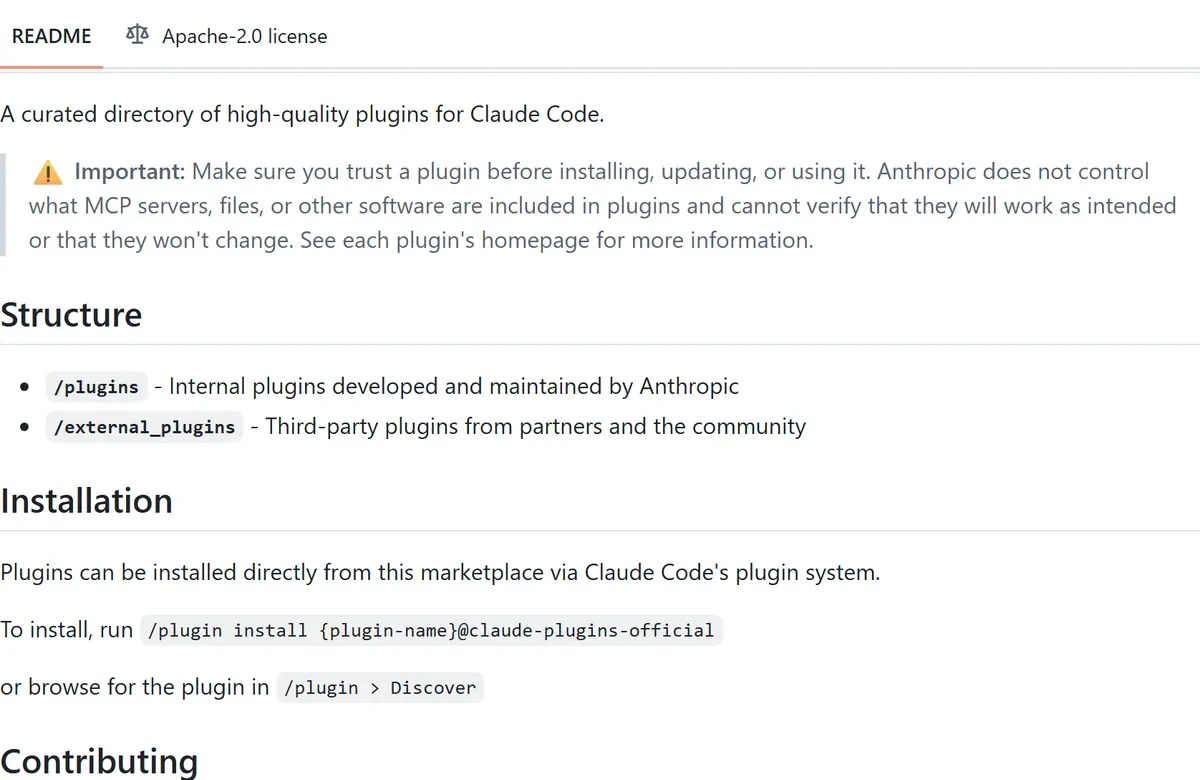 Figure 1: The top of the official marketplace README (source: GitHub)
When I opened the official marketplace README, the first thing on it was a warning box: make sure you trust a plugin before installing, updating or using it; Anthropic doesn’t control which MCP servers, files or other software plugins include, and can’t verify they’ll work as intended or won’t change. Below that, it explains the repo’s two areas: /plugins holds the ones Anthropic develops and maintains, /external_plugins holds partner and community plugins.
You install with /plugin install <name>@claude-plugins-official, or type /plugin to browse the Discover tab. The official docs say Claude Code adds this marketplace for you the first time you start an interactive session.
Here’s what a plugin can contain:
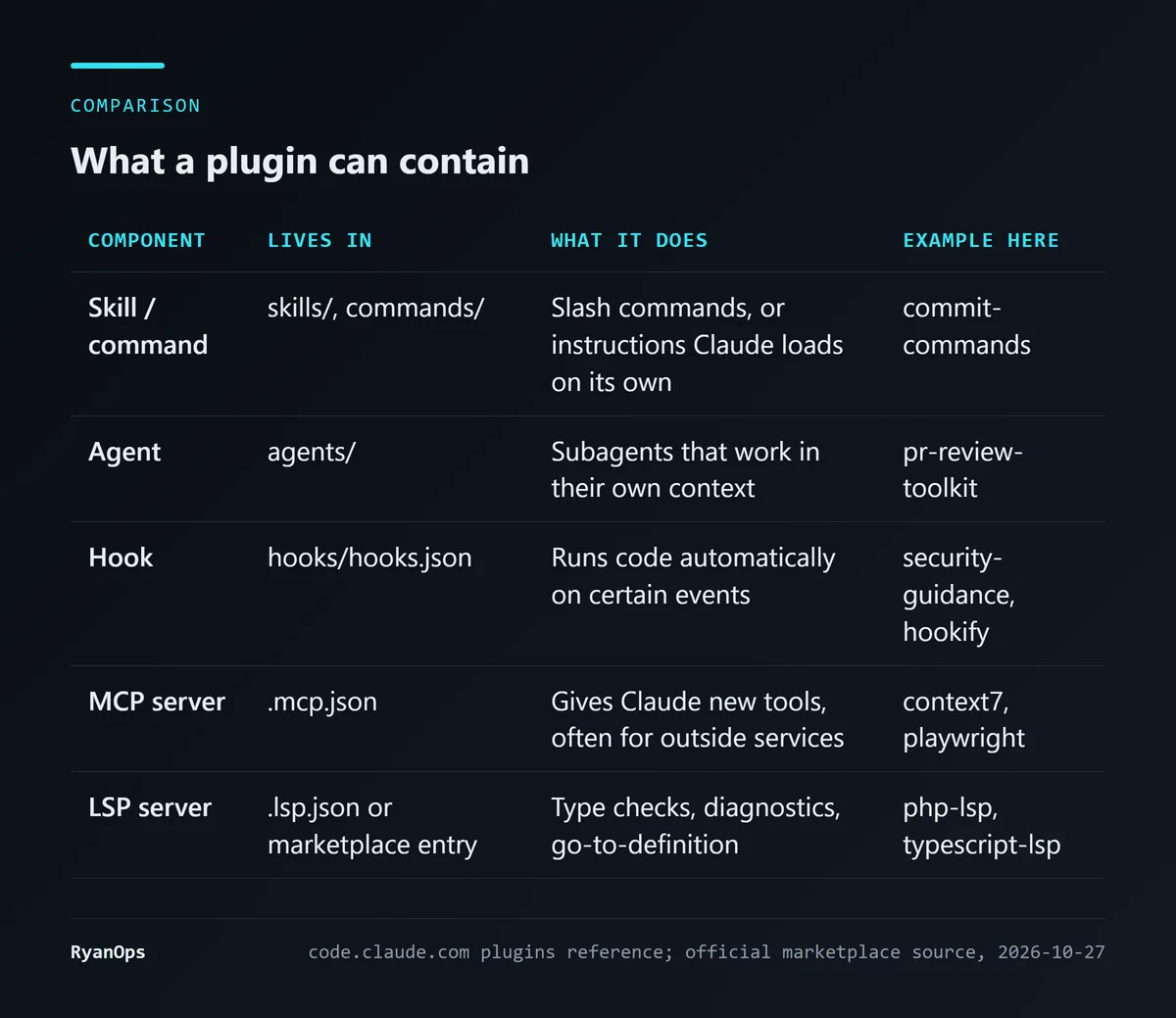 Figure 2: The main plugin components (data: code.claude.com plugins reference)
Beyond these five, the reference also lists output styles, bin/ executables, settings.json and more. The table matters because the components differ completely in cost and risk: skills and agents take up conversation context; hooks run code automatically when you’re not looking; MCP servers may send data to someone else’s server. For each plugin below, I’ll say which kind it is.
You also choose a scope when installing. The docs describe three: user (enabled in every project on this machine), project (written to .claude/settings.json, so once committed it’s on for the whole team), and local (just you, just this repo). Local overrides project, which overrides user. The official marketplace auto-updates by default; other third-party marketplaces don’t.
Check the cost first: how many tokens does each plugin keep loaded?
This is the most useful thing almost nobody mentions. Claude Code has a command, claude plugin details <name>, that lists a plugin’s components and its projected token cost. By default it only looks at installed plugins; the first time I ran it on one I hadn’t installed, the error message itself suggested passing --plugin-dir to load one from disk. Point that global flag at a plugin folder and you can query it without installing:
claude --plugin-dir <plugin folder> plugin details <name>The output gives two kinds of cost. “Always-on” is added to every conversation, mostly the name and description of each skill and agent, which Claude needs in order to decide when to use them. “On-invoke” is the full content, loaded only when that skill or agent actually runs.
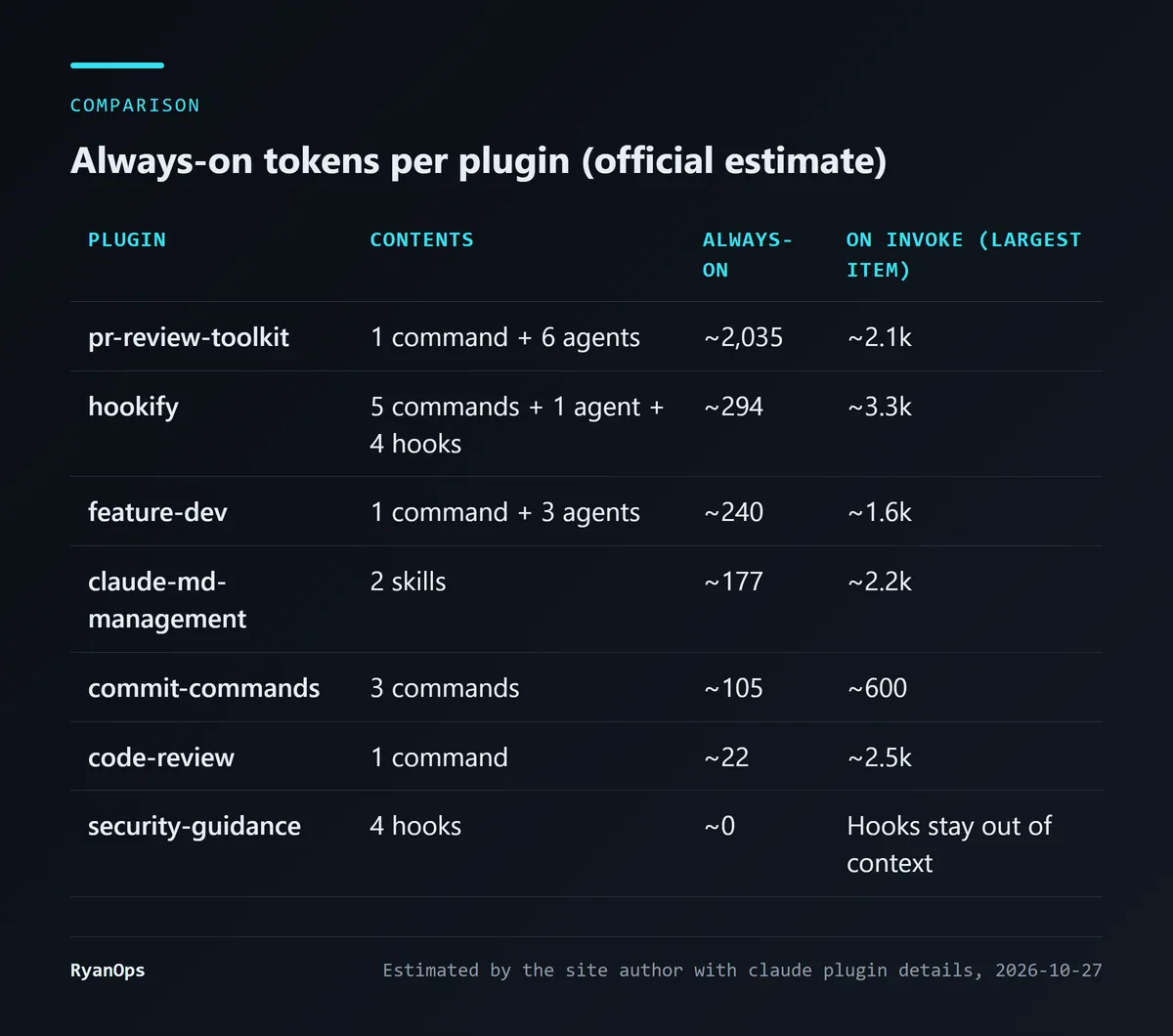 Figure 3: My estimates with
claude plugin details, October 27, 2026 (the tool’s own estimates)
A few observations:
- pr-review-toolkit is the heaviest, at about 2,035 always-on tokens. It ships 6 agents, and every agent’s description stays loaded; code-simplifier alone is about 730 and silent-failure-hunter about 460.
- code-review needs only about 22. It has a single command with a short description; the full 2.5k loads only when you run it.
- security-guidance is 0. It’s all hooks, and the tool labels them “harness-only — no model context cost”: Claude Code runs hooks itself, outside the model’s context. But zero tokens doesn’t mean zero cost, as we’ll see.
The output’s last line says token counts are estimates and may differ from actual usage. I should also flag what the table doesn’t cover: the LSP plugins have no config file in their local folder (the config lives in the marketplace listing), and I didn’t run the MCP ones because I didn’t want to risk them actually starting an outside program. The docs mention that the Installed tab in /plugin has a “Not used recently” group of plugins you haven’t used lately that still add startup and context cost, which is worth clearing out now and then.
Here are my 10 (the LSP plugins count as one, since you pick by language).
1. LSP: let Claude see type errors right after it edits
php-lsp, typescript-lsp, pyright-lsp and the rest of this family wire a language server into Claude Code. After Claude edits a file it gets diagnostics directly: type errors, missing methods, go-to-definition, without waiting for you to run the tests.
When I opened the php-lsp folder, all it contained was a README and a LICENSE. The real config sits in this plugin’s entry in marketplace.json (strict: false): it starts intelephense --stdio for the .php extension. typescript-lsp runs typescript-language-server --stdio and covers 8 extensions, including .ts, .tsx, .js and .mjs.
One catch: the plugin doesn’t include the language server itself. php-lsp’s README tells you to install it yourself with npm install -g intelephense first; without it, the plugin has nothing to start.
Both the Scrimba and Composio roundups put an LSP plugin first. I agree: it doesn’t change how Claude behaves, it just gives it more accurate feedback, which pays off most for languages with type information like PHP and TypeScript.
2. commit-commands: commit in one command
It has three commands: /commit, /commit-push-pr and /clean_gone. About 105 always-on tokens.
I read commit.md, and it’s a good example of how a command file is written. The !-plus-backticks syntax at the top runs git status, git diff HEAD and git log --oneline -10 before the command reaches Claude and drops the results straight into the prompt. Claude sees the changes and your recent commit style from the start instead of spending a few turns looking them up.
The other thing to look at is the allowed-tools field. /commit pre-approves git add, git status and git commit; /commit-push-pr also pre-approves git push and gh pr create. The official skills docs are clear that allowed-tools doesn’t restrict which tools Claude can use; it means the listed tools won’t ask you first. In other words, when you run /commit-push-pr, Claude pushes to the remote and opens the PR without stopping for your approval. Know that before you use it.
/clean_gone removes local branches whose remote branch has been deleted, along with their worktrees. /commit-push-pr needs the GitHub CLI (gh) installed and logged in.
3 and 4. code-review and pr-review-toolkit: a second pair of eyes before a PR
Both are about review, but they’re designed very differently.
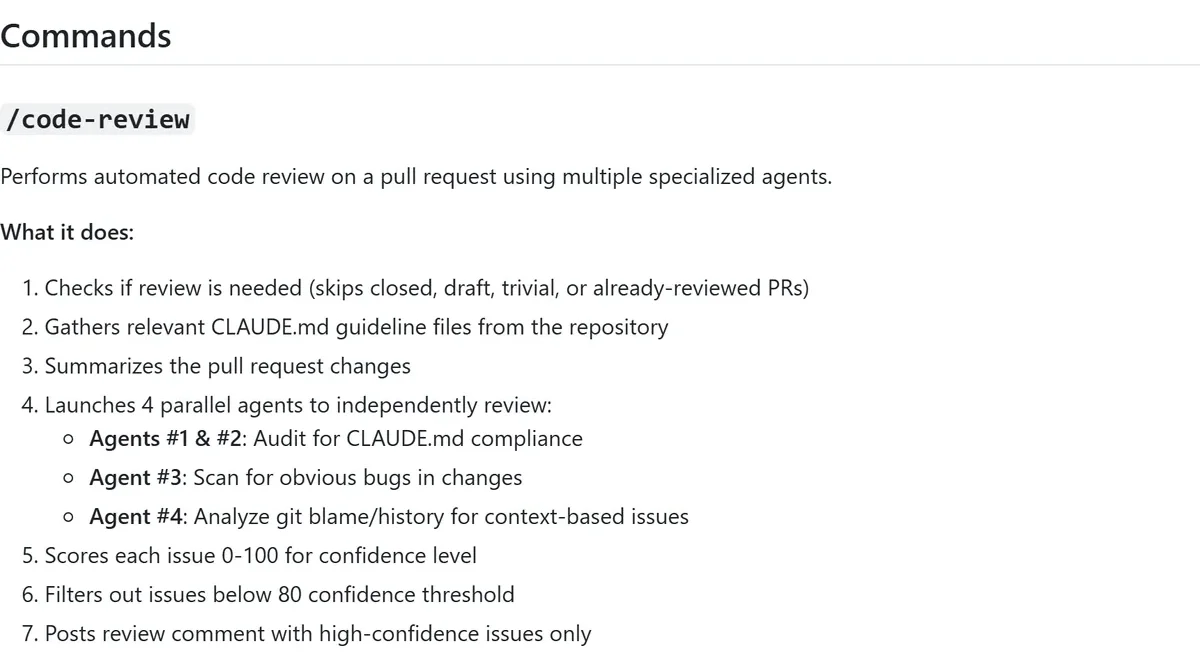 Figure 4: The code-review plugin’s workflow (source: GitHub README)
code-review has a single /code-review command aimed at GitHub PRs. It skips closed, draft, trivial or already-reviewed PRs, gathers the repo’s CLAUDE.md files, then launches 4 agents in parallel: two check compliance with CLAUDE.md, one looks for obvious bugs, and one reads git blame and history. Each issue gets a confidence score from 0 to 100, anything under 80 is thrown out, and only the high-confidence issues get posted as a PR comment. The README also lists what it deliberately filters out: problems that existed before the PR, things linters catch, and pedantic nitpicks.
Its allowed-tools pre-approves gh pr comment, so it won’t ask before posting.
One small point: on my machine, with no plugins installed, Claude Code’s command list already includes a built-in /code-review. The docs say that when a plugin skill shares a name with a skill elsewhere, both load, and the plugin’s version is called with its namespace, /code-review:code-review. I’m not going to compare which is better; just don’t mistype it once you’ve installed the plugin.
pr-review-toolkit is 6 specialised agents instead: comment-analyzer checks comments against the code, pr-test-analyzer looks for gaps in test coverage, silent-failure-hunter finds swallowed errors, type-design-analyzer looks at type design, plus a general code-reviewer and code-simplifier. You can run them all with /review-pr, or just tell Claude “check the error handling” and let it pick the right agent.
The price is the 2,035 always-on tokens in the table above. My suggestion: if you only want an occasional check before sending a PR, code-review is far lighter; if you review lots of PRs every day, pr-review-toolkit’s division of labour is finer and worth the cost. You can also install pr-review-toolkit at project scope so it’s only on where you need it.
5. feature-dev: understand the code before writing any
/feature-dev breaks building a new feature into 7 phases: discovery, codebase exploration, clarifying questions, architecture design, implementation, quality review and summary. Phases 2, 4 and 6 automatically call in three agents: code-explorer, code-architect and code-reviewer.
The README flags phase 3 as critical: make sure nothing is ambiguous before design starts. That targets a very common problem, where the AI starts writing straight away and discovers halfway through that it misunderstood the requirement. At about 240 always-on tokens, it’s not expensive for the process it gives you.
6. security-guidance: zero tokens, but not free
This is the most elaborate of the 10, and the one whose cost is easiest to misread.
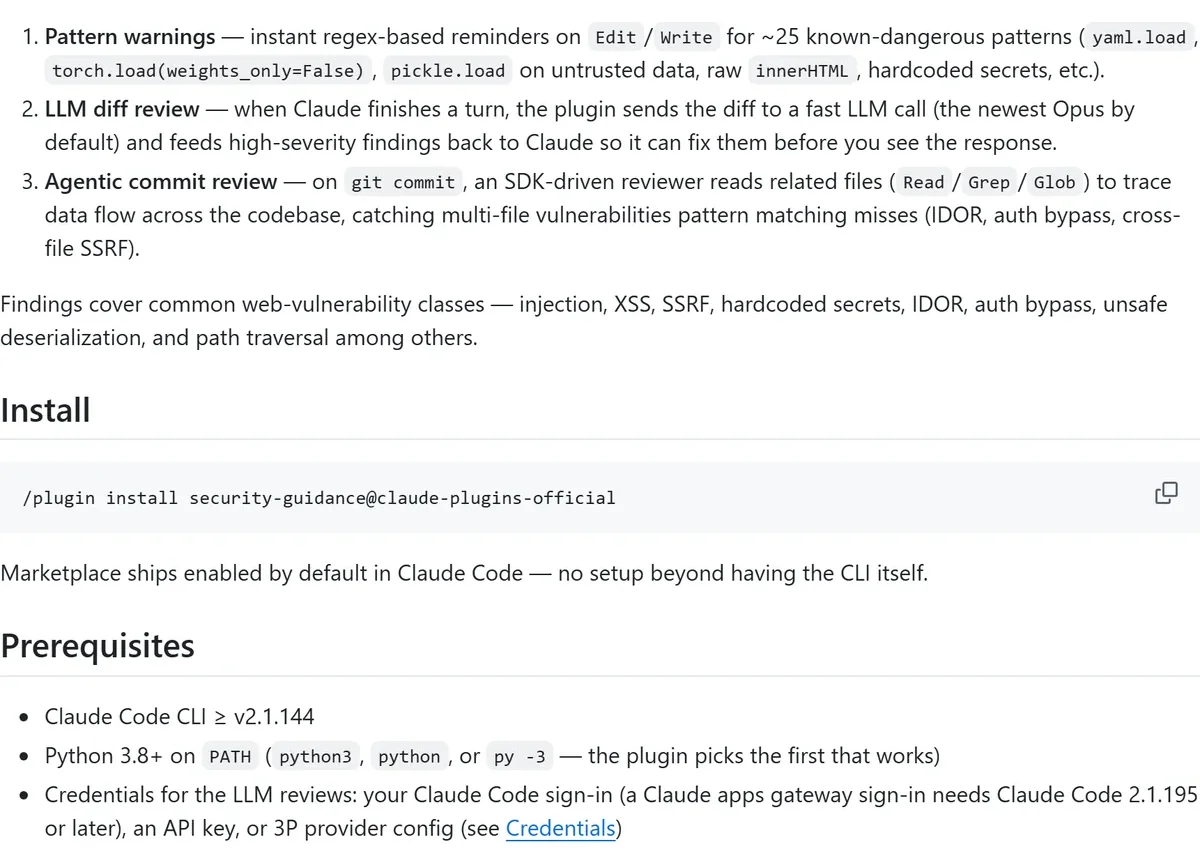 Figure 5: security-guidance’s three layers and requirements (source: GitHub README)
The README describes three layers:
- Pattern warnings: when Claude edits or writes a file, regexes check for about 25 dangerous patterns, such as
yaml.load,pickle.loadon untrusted data, rawinnerHTMLand hardcoded secrets. - LLM diff review: each time Claude finishes a turn, the diff goes to an LLM call, the newest Opus by default, and high-severity findings are fed back so Claude can fix them before you see the response.
- Commit review: on
git commit, a reviewer driven by the Agent SDK reads related files and traces data flow across them, catching things like IDOR and auth bypass that pattern matching misses.
That’s what zero tokens means here: none of these reviews sit in your conversation’s context, so plugin details reports 0. But layers 2 and 3 call Opus every time, using your Claude Code sign-in or API key. Every finished turn and every commit or push is another round of Opus usage. That’s its real cost.
I read its hooks.json, and there are a few more practical points:
- It needs Claude Code 2.1.144 or later and Python 3.8 or later on PATH.
- Every hook runs a wrapper script through
bash, so bash has to be findable. When I checked in PowerShell on my machine,bashresolved to thebash.exeinSystem32, which is WSL’s launcher, not the one that ships with Git. Which one Claude Code uses when running hooks depends on its own environment, and I haven’t run it, but it’s worth keeping in mind. - The SessionStart hook checks whether the Claude Agent SDK can be imported, and if not, creates a Python virtual environment at
~/.claude/security/agent-sdk-venvand installs the SDK there. That folder lives under your user directory; if your system drive is short on space, know that it’ll grow there. - You can switch layers off with environment variables:
ENABLE_STOP_REVIEW=0disables only the per-turn review,ENABLE_COMMIT_REVIEW=0the commit review, andSECURITY_GUIDANCE_DISABLE=1the whole plugin.
My view: if security matters to you, this is one of the most worthwhile of the 10, but start with only layers 1 and 3, watch your usage for a while, and then decide whether to turn on the per-turn diff review.
7. hookify: write rules in Markdown to break Claude’s bad habits
If you find yourself correcting Claude about the same thing over and over, say it keeps using console.log or keeps reaching for rm -rf, hookify lets you turn those corrections into rules.
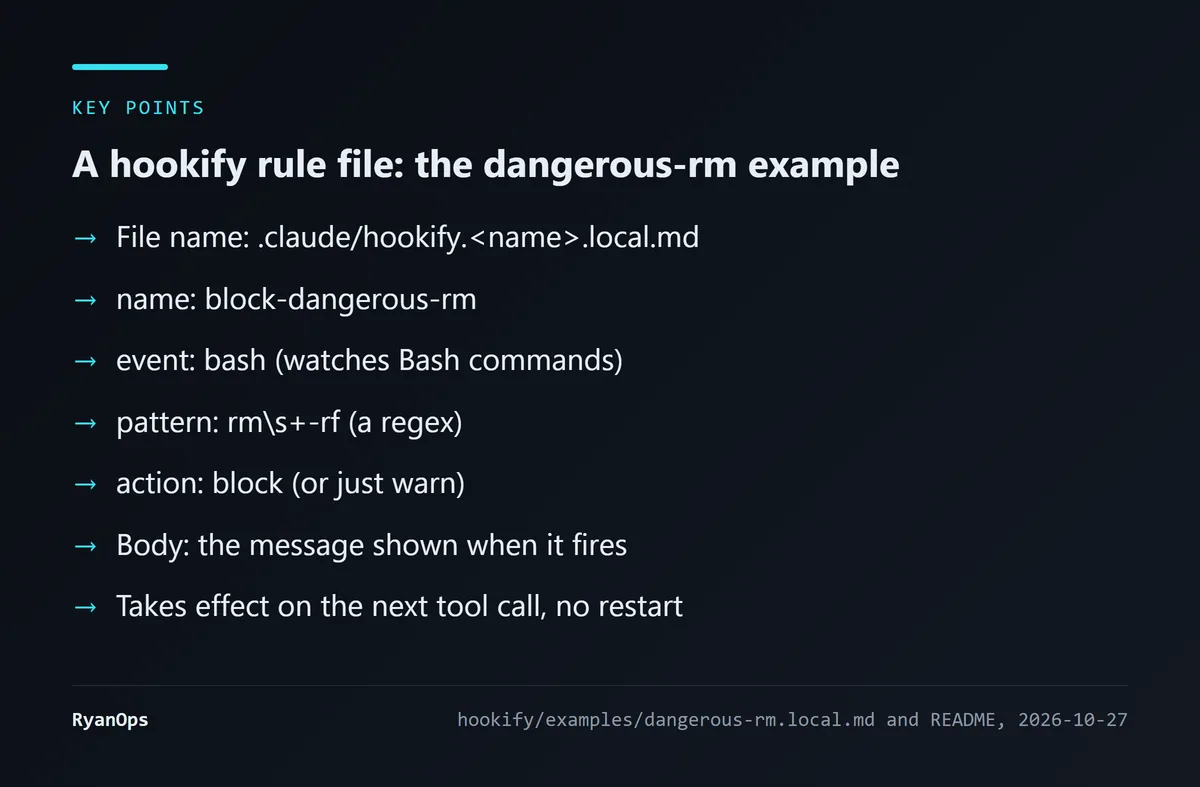 Figure 6: hookify’s rule file format (data: hookify examples)
A rule is a Markdown file at .claude/hookify.<name>.local.md. The YAML at the top says which event to watch (bash, file, stop and others), which regex to match, and whether to block (block) or only warn (warn); the body is the message shown when it fires. The README says a rule takes effect on the very next tool call after you save it, with no restart.
The handiest form is /hookify with no arguments: it analyses the recent conversation, finds behaviour you corrected or were frustrated by, and writes rules for you. About 294 always-on tokens.
Like security-guidance, hookify has 4 hooks that run its Python rule engine before and after tool calls, at the end of a turn and when you submit a message. The difference is that security-guidance tries python3, python and py -3 in turn and uses the first that works, while hookify’s hooks.json hard-codes python3.
That’s worth checking on Windows. I looked in PowerShell on my own machine: python3 points to a 0-byte file in the WindowsApps folder, which is a Windows app execution alias, and actually running python3 --version printed nothing and exited with code 9009. The Python on my machine is installed elsewhere and isn’t on PATH. Claude Code may run hooks in a different environment from my PowerShell, so I can’t say hookify would definitely fail on this machine, but if you install it and your rules never fire, this is the first thing to check.
8. claude-md-management: keep CLAUDE.md from going stale
CLAUDE.md is the project description Claude Code reads every time. The trouble is that projects change and CLAUDE.md often doesn’t keep up. This plugin has two tools: the claude-md-improver skill checks CLAUDE.md against the current code for quality and stale content, and the /revise-claude-md command, at the end of a stretch of work, adds what came up in the conversation but isn’t in CLAUDE.md yet. About 177 always-on tokens.
I think its best moment is when you’ve spent a session explaining the same project convention to Claude over and over. Run /revise-claude-md once and you won’t have to explain it again.
9 and 10. MCP plugins: find out where the code runs
MCP plugins connect Claude to new outside tools. Their risk model is different from everything above, so I opened the config of four commonly recommended MCP plugins one by one; context7 and playwright are my numbers 9 and 10.
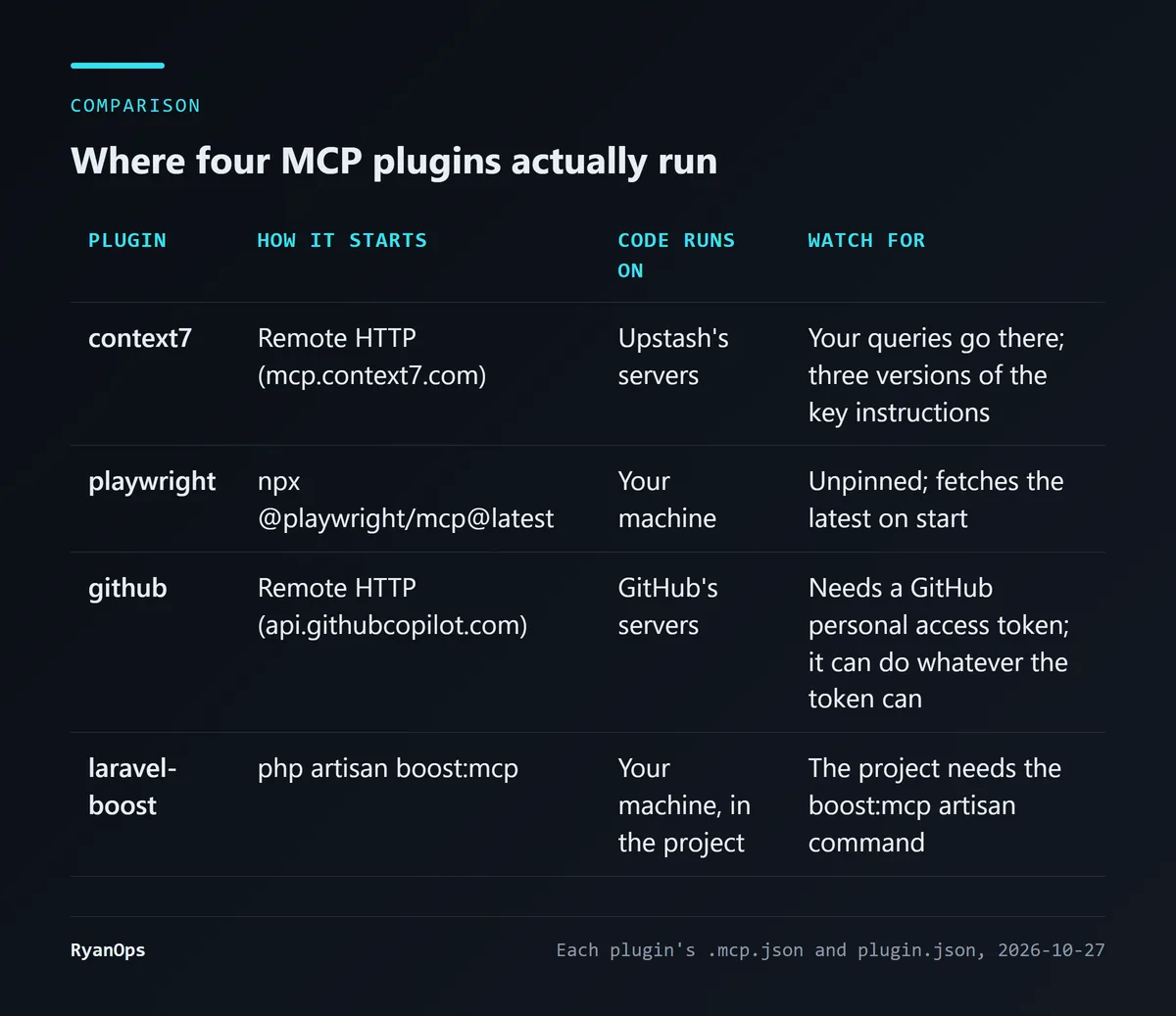 Figure 7: My comparison from each plugin’s
.mcp.json (data: official marketplace)
context7 (Upstash) lets Claude look up current documentation and examples for all kinds of libraries, so it doesn’t use outdated APIs. It offers two tools: resolve-library-id finds a library’s ID and versions, and query-docs fetches the docs. It’s a remote HTTP MCP server, so nothing runs on your machine, but your queries go to Upstash’s servers.
Reading its config, I found three versions of the API key instructions: the marketplace listing says it works anonymously and you can set CONTEXT7_API_KEY for higher limits; plugin.json says to “authenticate with Context7 when prompted”; the README says the config picks up that environment variable automatically. Yet .mcp.json contains just a URL, with nothing referencing that variable. A remote MCP server can run its own sign-in flow, so I can’t conclude the variable does nothing, only that the config file doesn’t show how it would be sent.
playwright (Microsoft) lets Claude open a browser, click buttons, fill in forms and take screenshots, which suits end-to-end tests or checking how a page you changed looks. Its .mcp.json is npx @playwright/mcp@latest: the code runs on your machine and the version isn’t pinned, so each start pulls whatever is newest on npm at that moment. That’s a trade-off between convenience and predictability, and you should know which side you’ve picked.
github connects to GitHub’s remote MCP server, using GITHUB_PERSONAL_ACCESS_TOKEN as a Bearer token. Whatever the token can do, Claude can do, so keep the token’s scope under your own control. It isn’t in my 10 because commit-commands plus gh covers most day-to-day needs, but many roundups list it.
As an aside, Laravel developers may want to look at laravel-boost: its config runs php artisan boost:mcp in the project folder, so the project needs that artisan command before it can start.
How to choose: by your situation
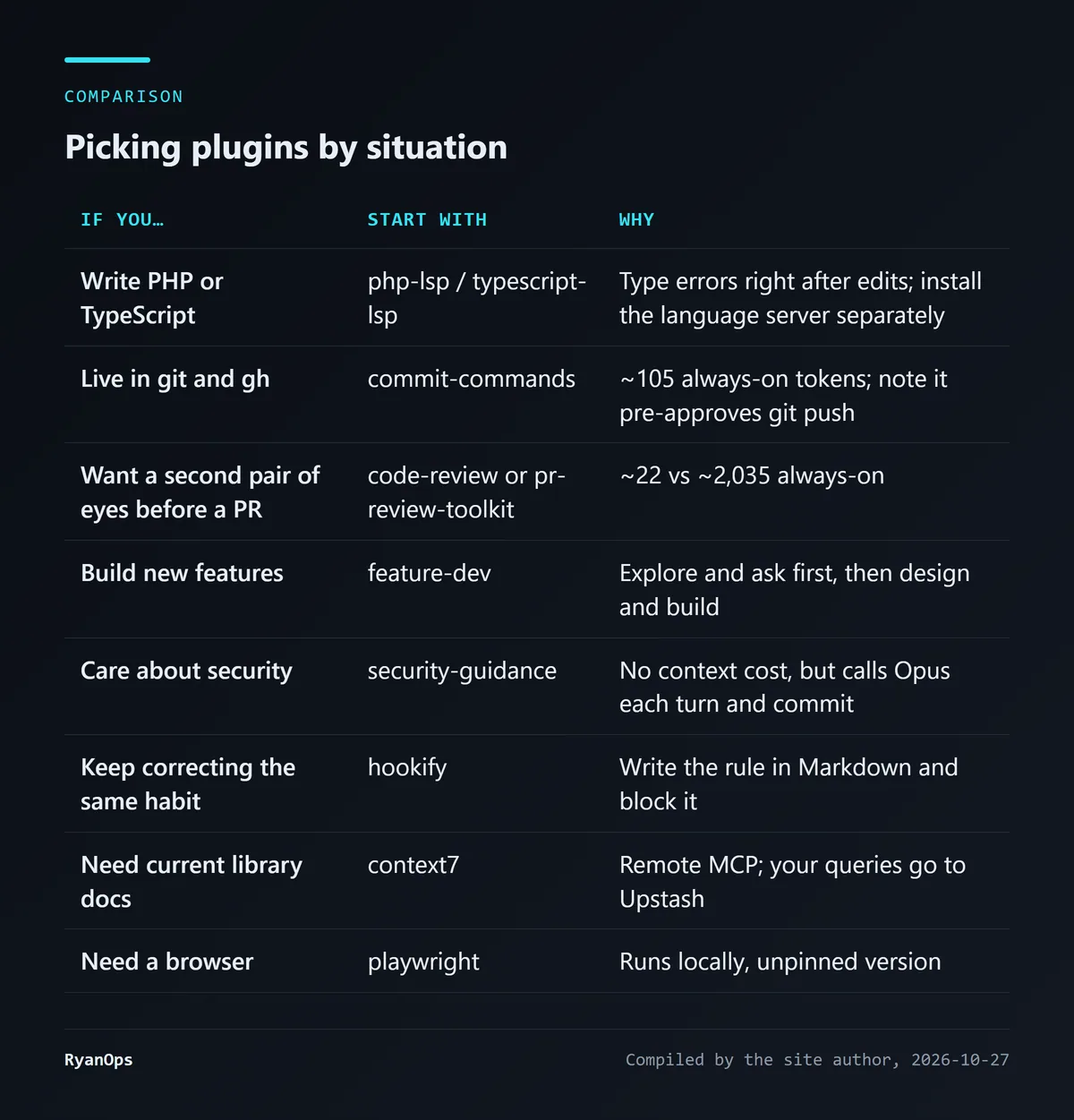 Figure 8: My picks based on the analysis above
The two roundups I consulted, Scrimba (Per Harald Borgen, August 17) and Composio (June 1), overlap with my picks: both include LSP, GitHub, commit-commands, review plugins and security-guidance, and Scrimba also recommends context7 and playwright. The difference is that they say little about cost. Composio lists public install counts, for example about 830,000 for Frontend Design and about 350,000 for Context7, but those are its figures as of June 1 and I can’t verify them; it also ranks its own product first, so read it with that in mind.
Two you might run into that aren’t on my list: frontend-design and skill-creator. They’re really single skills packaged as plugins, and I’ll go into them in a separate article about skills. The Claude Code Discord plugin I wrote about recently comes from the same official marketplace, and that piece shows how to read a plugin’s source to judge whether it’s safe.
My own rules come down to three:
- Install one or two at a time. Each plugin’s always-on cost stacks up, and a plugin you don’t use is something you pay for in every conversation.
- Run
plugin detailsbefore installing. In 30 seconds you know how much it keeps loaded, whether it has hooks, and whether it has MCP servers. - Look twice at hooks and MCP. Skills and agents are just text for Claude to read; hooks run code on your machine automatically, and MCP servers may send data out. The README’s “make sure you trust it” matters most for these two kinds.
If you’re also weighing how much to let an AI agent do, the same three rules apply: see what it can do first, then decide whether to let it.


