Claude Code skills: what to install and the cost
What Claude Code skills are, how they load, and which official ones to install. I estimated the token cost of 23 SKILL.md files and list their dependencies.
The ~/.claude/skills folder on my machine holds 20 skills, and every time Claude Code starts, their names and descriptions are put into the conversation. I estimated the cost with Claude Code’s own tool: together, those 20 take about 3,713 tokens per conversation before anything has happened.
That number is why I wrote this. There are plenty of “best skills” lists online, but few of them say what installing one costs you. This piece first explains what a skill is and how it gets loaded, then uses those estimates to go through the skills in Anthropic’s official repository that are worth installing.
First, my material. Of those 20 skills, 17 come from Anthropic’s anthropics/skills repository and 3 were written by this site’s author; those 3 aren’t part of the recommendations. When I checked GitHub again today, the repository’s skills folder had 19 entries. The two extra ones, academy-guide and discernment-nudge, aren’t in my local copy; I haven’t read them, so this piece doesn’t cover them. This blog’s project folder also has 3 project skills, which I’ll use later as real examples of writing a skill. For this piece I read those 23 SKILL.md files and estimated their cost, but I did not install or run any new skill to write it.
What is a skill? A folder with instructions
A skill is a folder that always contains a SKILL.md. The file starts with YAML settings, followed by instructions for Claude written in Markdown. The folder can also hold reference docs, scripts and templates.
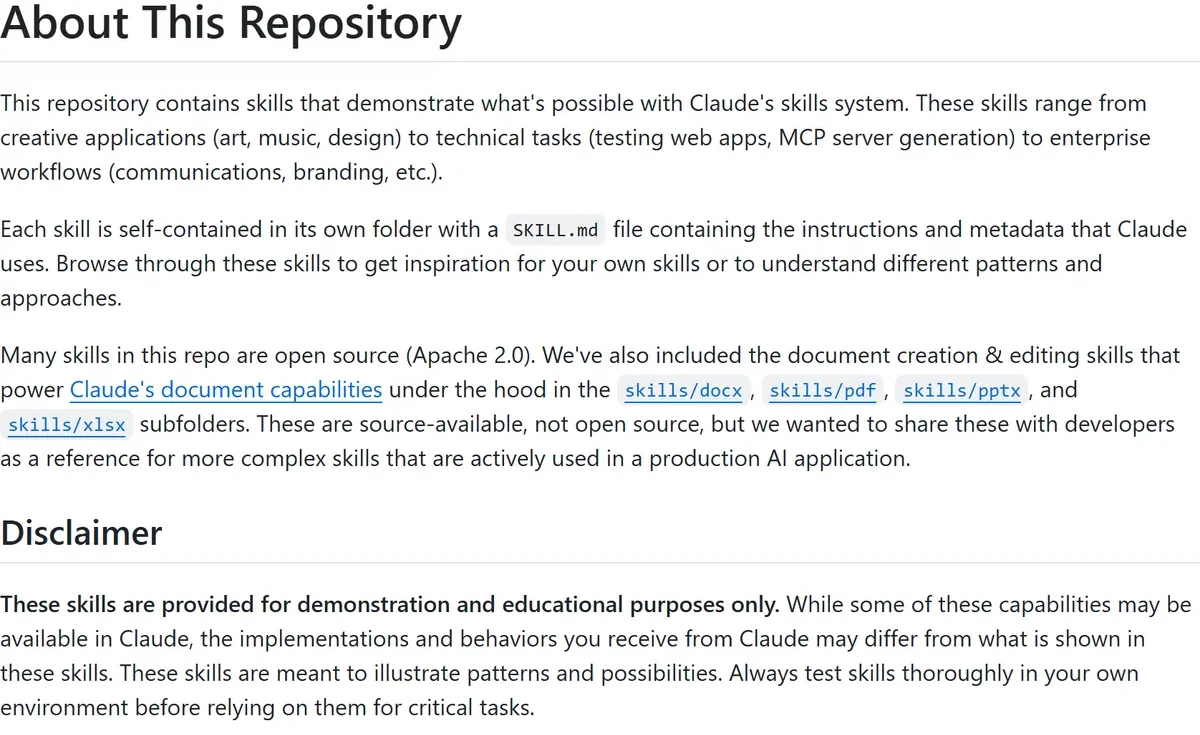 Figure 1: The anthropics/skills README and its disclaimer (source: GitHub)
I opened the anthropics/skills README. Three things are worth knowing up front:
- There are two licences. Most skills are Apache 2.0 open source. But for the four document skills,
docx,pdf,pptxandxlsx, the README says plainly that they are “source-available, not open source”. They are what powers Claude’s own document features, published as a reference for complex skills. My local copies match: those four LICENSE files begin with ”© 2025 Anthropic, PBC. All rights reserved.”, while the others that include a LICENSE use the Apache License. - A disclaimer. The skills are for demonstration and educational purposes only. The behaviour you get from Claude may differ from what’s shown, so test them yourself before relying on them for important work.
- Installation. In Claude Code, run
/plugin marketplace add anthropics/skills, then install one of the two plugins,document-skillsorexample-skills. You can also copy a single skill folder straight into~/.claude/skills/.
Where a skill lives decides who can use it. The official docs list several locations. Personal skills go in ~/.claude/skills/<name>/SKILL.md and apply to all your projects. Project skills go in the project’s .claude/skills/, and once committed the whole team has them. Skills that come with a plugin are invoked as /plugin-name:skill-name. When names collide, enterprise settings win over personal ones and personal over project ones; plugin skills are namespaced, so they sit alongside a same-named skill rather than replacing it.
Also, custom slash commands that used to live in .claude/commands/ have now been merged into skills. The docs say both .claude/commands/deploy.md and .claude/skills/deploy/SKILL.md create /deploy. Old command files keep working, but skills add supporting files, control over who can invoke them, and automatic loading.
How does a skill get loaded? Three levels, read on demand
This is the key to understanding what skills cost. Anthropic’s engineering blog post introducing Agent Skills, published on 16 October 2025, calls it progressive disclosure.
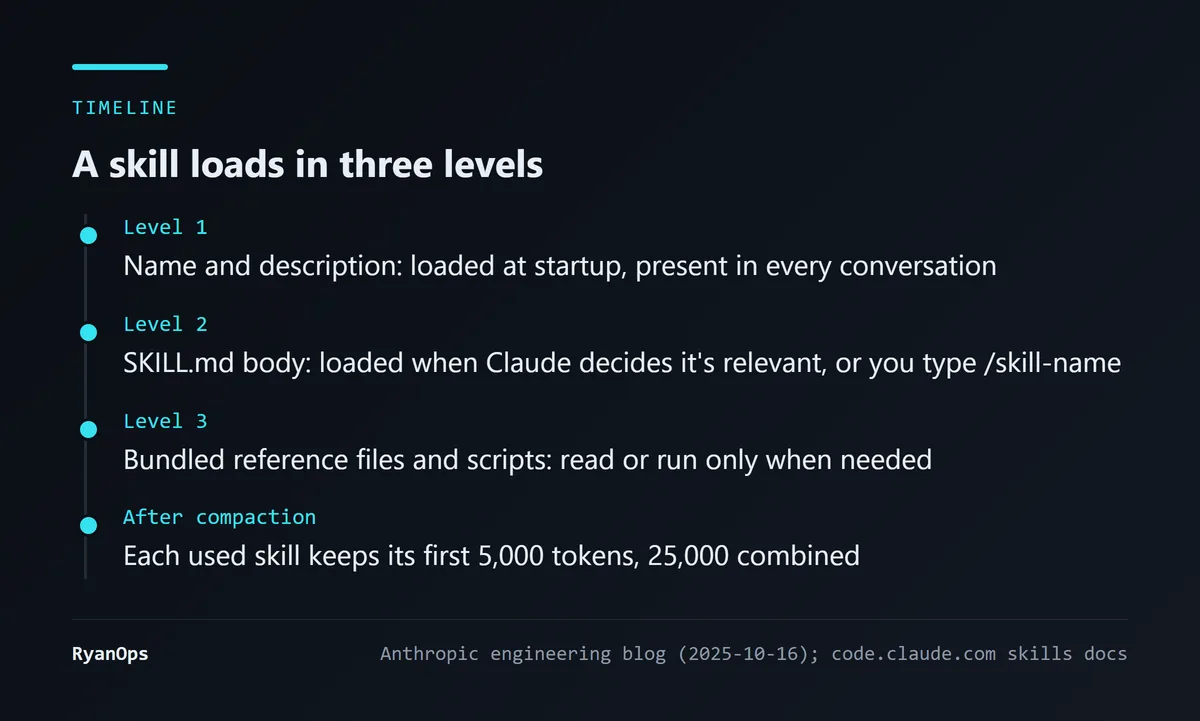 Figure 2: The three loading levels of a skill (sources: Anthropic engineering blog, Claude Code skills docs)
- Level 1: at startup, the name and description of every installed skill go into the system prompt. That description is how Claude decides when to use the skill.
- Level 2: only when Claude decides the skill is relevant to the current task, or you type
/skill-nameyourself, does the full SKILL.md load. The official docs draw the contrast explicitly: CLAUDE.md is loaded in full every time, while a skill’s body loads only when it’s used. - Level 3: other files in the skill folder are read only when Claude needs them. Scripts can be executed directly, and only their output enters the context, not the script itself.
One detail fewer people notice: when a long conversation gets compacted, Claude Code re-attaches the most recent content of each skill that was used, but keeps only the first 5,000 tokens of each, with a combined cap of 25,000, filled starting from the most recently used skill. A skill you used long ago may disappear entirely after compaction.
So level 1 is the price you always pay; levels 2 and 3 you pay only when used.
What does a skill cost? My estimates
Claude Code has a command, claude plugin details, that estimates a plugin’s token cost. It can’t measure a personal skills folder directly, so I copied each SKILL.md into a temporary dummy plugin folder and ran the command on that. Two caveats: these are the tool’s estimates, and it says itself that they may differ from actual usage; and the “on invoke” figure counts only the SKILL.md body, not any supporting reference files.
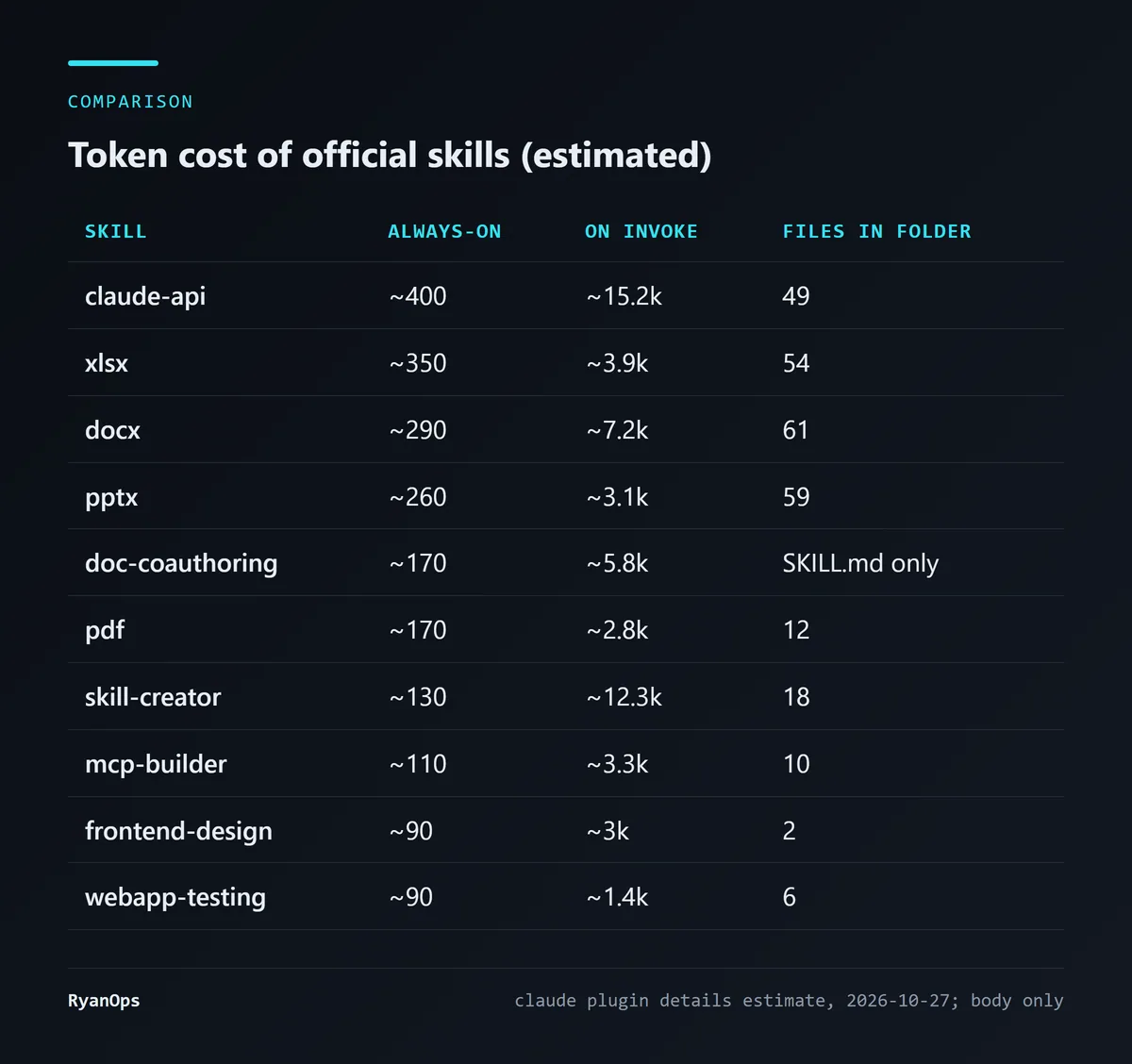 Figure 3: My estimates of the official skills’ cost, 27 October 2026 (figures are the tool’s estimates)
The 20 personal skills come to about 3,713 always-on tokens in total. Take away the 3 written by this site’s author (about 880 combined, after rounding) and the official 17 come to a little over 2,800.
A few things stand out:
- Always-on cost tracks description length. claude-api’s description lists a long string of trigger and skip conditions, so it costs about 400 always-on, the most of the 17. xlsx and docx also have long descriptions, because they want Claude to think of them even when you only say words like “report” or “memo”.
- The gap on invoke is much bigger. claude-api is about 15.2k and skill-creator about 12.3k, so one use drops a large block into the context. internal-comms needs only about 410, and theme-factory about 1.1k.
- Folder size is not context cost. The docx folder has 61 files, mostly XML schemas and Python scripts, but they’re only read or run when needed; they don’t enter the context automatically.
My conclusion: installing all 17 means paying close to 3,000 tokens up front in every conversation, which isn’t worth it for most people. Pick the ones you’ll actually use.
The official skills worth installing, one by one
The document four: docx, xlsx, pptx, pdf
If you want Claude to produce Word, Excel, PowerPoint or PDF files, these four are the most useful. They aren’t just instructions for Claude; they ship with a lot of Python scripts: 15 for docx, 13 for xlsx, 16 for pptx and 8 for pdf. The scripts handle things like unpacking, validation and filling PDF forms, the kind of work Claude tends to get wrong when it writes the code itself.
Know the dependencies before you install. The docx SKILL.md lists pandoc (text extraction), the docx npm package (creating new documents), LibreOffice (PDF conversion) and Poppler’s pdftoppm (converting to images). xlsx requires that whenever formulas are involved, you recalculate with LibreOffice through its recalc.py. I checked my own machine: soffice, pandoc and pdftoppm are all missing. That doesn’t mean the skills won’t work, since basic reading and writing goes through Python libraries, but PDF conversion and formula recalculation will get stuck.
On licensing, one more reminder: these four are source-available. You can read and use them, but you can’t treat them as an open-source project to modify and redistribute.
skill-creator: a skill for writing skills
If you plan to write your own skills, install this one first. The process it describes: decide what the skill should do, write a draft, create a few test prompts, have Claude run them with the skill loaded, review the results with you, rewrite, and repeat until you’re happy.
It ships with 10 Python scripts, covering running evals, aggregating benchmarks, generating reports, and a dedicated improve_description.py for optimising the description. That last one ties back to level 1: how well the description is written decides whether Claude thinks of your skill at the right moment.
The price is about 12.3k tokens on invoke. The official plugin marketplace also has a skill-creator plugin with the same name.
frontend-design: so AI-built screens don’t all look the same
This skill aims to stop the interfaces Claude builds from looking like obvious AI defaults. The sections in my copy are: start from the subject itself, design principles, a process that runs from brainstorming to implementation to self-review, and restraint and self-critique. It costs only about 90 tokens always-on.
One interesting finding: there’s also a copy in the plugin marketplace. I compared the two SKILL.md files. The descriptions are identical, but the marketplace copy is 71 lines and the one in my personal folder is 55. Plugins from the official marketplace auto-update by default; a copy placed directly in ~/.claude/skills doesn’t, so you could be on an old version without knowing it.
webapp-testing: testing local web pages with Playwright
It drives a browser with the Python version of Playwright to test the web page you’re developing locally. It includes a with_server.py that starts and stops the dev server (it can manage several at once), so Claude doesn’t have to handle the server lifecycle itself. The approach its SKILL.md recommends is “reconnaissance, then action”: open the page, wait for network requests to settle, see what’s actually on the page, then decide where to click. About 90 always-on and about 1.4k on invoke, so it’s light.
If you’ve read my plugin recommendations, the playwright plugin mentioned there is an MCP server, while this is a skill plus scripts. Both can drive a browser; the difference is that one keeps its tool definitions loaded all the time and the other loads only when used.
mcp-builder: a guide to writing MCP servers
If you want to wrap an API as an MCP server for Claude, this skill covers both routes: Python (FastMCP) and Node/TypeScript (the official MCP SDK). The folder includes best practices, separate implementation guides for Python and Node, plus an evaluation script and a sample evaluation file so you can check whether Claude actually uses the tools you built well.
doc-coauthoring: a process for specs and proposals
It splits co-writing a document into three stages: gathering context, refining the structure through iteration, and reader testing, followed by a final review. I think the reader-testing step is the most valuable: once it’s written, the document is read from the point of view of someone who hasn’t seen the earlier discussion, to confirm it makes sense to its real readers. The folder contains just one SKILL.md, about 5.8k tokens on invoke.
claude-api: when you’re writing Claude API code
This is the most expensive of the 17 always-on (about 400) and the largest on invoke (about 15.2k). It covers model IDs, pricing, parameters, streaming, tool use, caching and more, and the folder has per-language subfolders for C#, Go, Java, PHP, Python and others.
One thing to watch: its SKILL.md has a section headed “Current Models (cached: 2026-06-04)”. A skill is a static file; its content is frozen on the day it was written. Models and prices change quickly, and the model list in my local copy was cached on 4 June. When you use it, still check numbers like prices against the official pages.
Writing your own skill: the fields you’ll use and the traps
The biggest value of the official skills is as templates. The skills that really pay off are usually the ones you write for your own workflow.
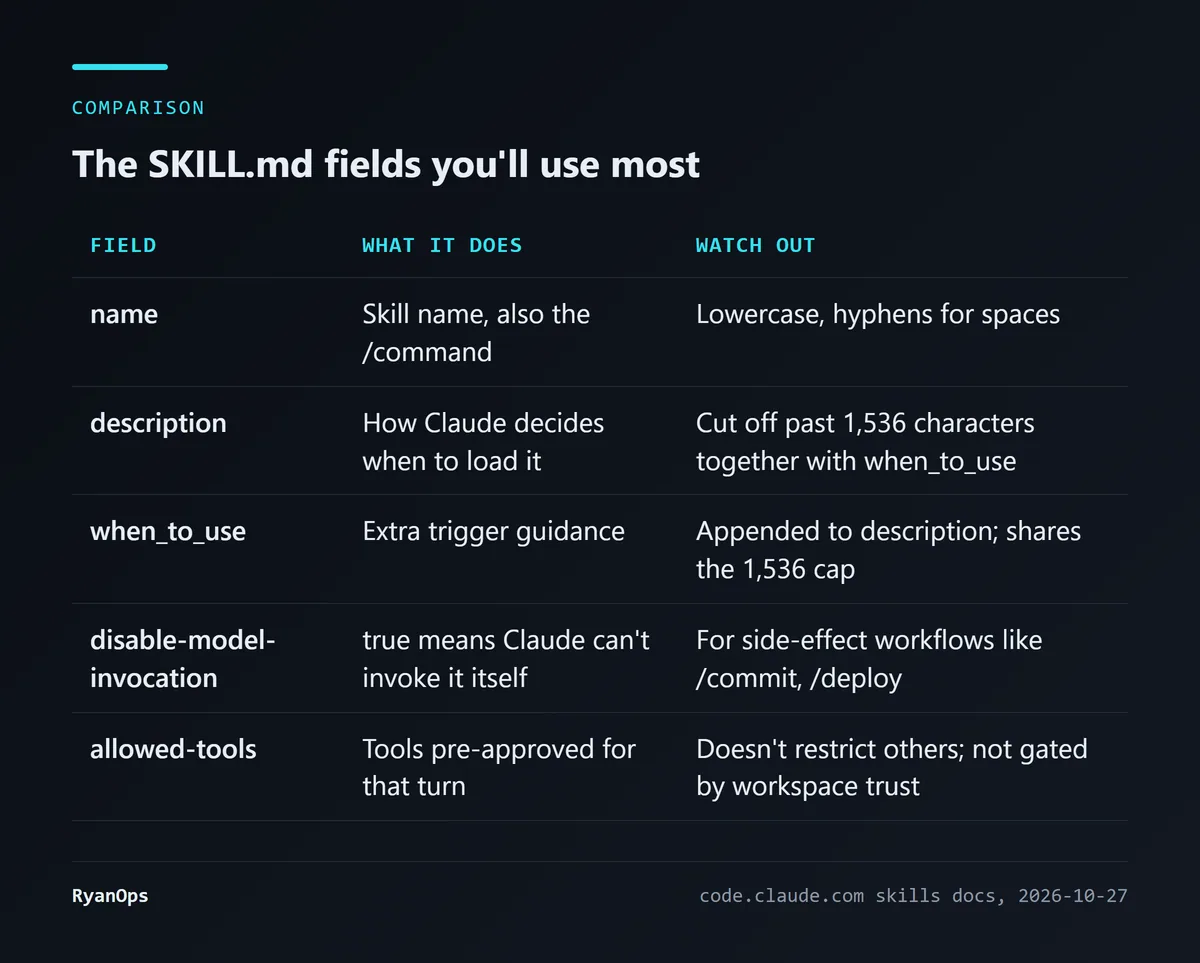 Figure 4: The most-used SKILL.md fields (source: Claude Code skills docs)
The anthropics/skills README says the frontmatter only needs two fields, name and description. But the official docs have a few rules worth knowing before you start:
- Put the most important use first in the description. In the skill listing,
descriptionpluswhen_to_usegets truncated past 1,536 characters. - Add
disable-model-invocation: trueto skills with side effects. With it set, Claude can’t decide to invoke the skill on its own; only you can trigger it with the command. The docs’ examples are/commit,/deployand/send-slack-message. - Keep SKILL.md under 500 lines. Move detailed reference material into separate files and take advantage of level 3’s read-on-demand behaviour.
- Changes take effect immediately. Adding, editing or deleting a skill in
~/.claude/skills/or a project’s.claude/skills/is picked up by the current session without a restart.
Take this blog’s own project skills as an example. The articles on this site are produced, reviewed and published by 3 project skills, and I estimated them the same way:
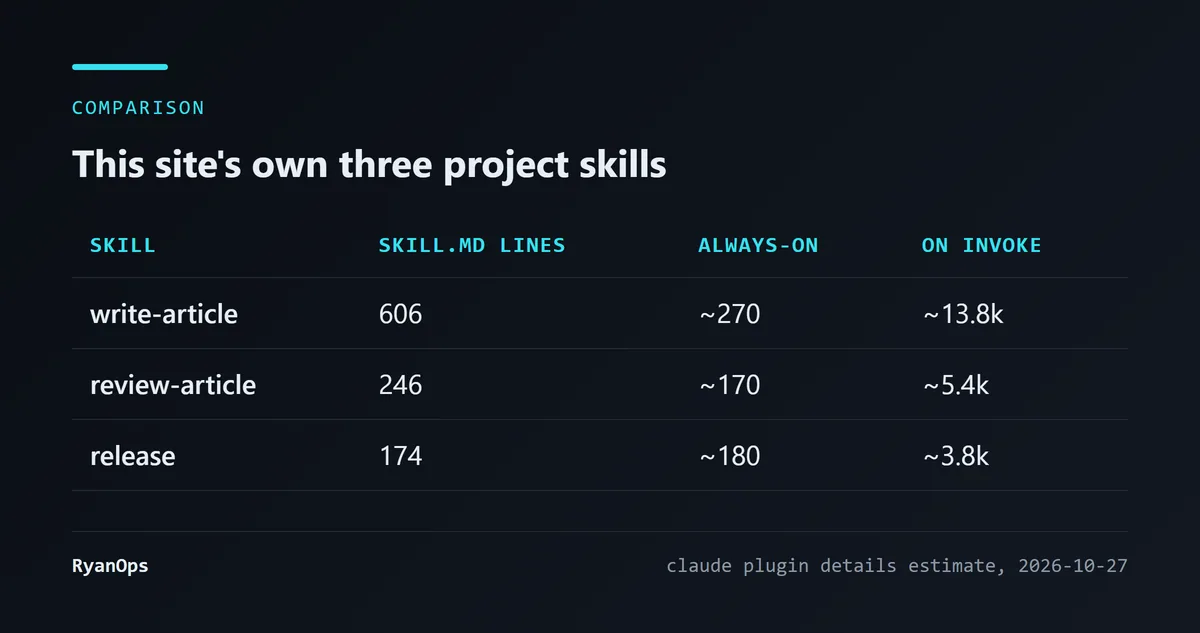 Figure 5: The three skills in this site’s
.claude/skills, estimated 27 October 2026
write-article is 606 lines, over the official 500-line guideline, and about 13.8k tokens on invoke, roughly the size of claude-api. By the docs’ advice, it should split its detailed rules into separate reference files. I’m pointing it out because it’s such a typical case: a skill keeps gaining rules as requirements grow, until it becomes one huge file. The compaction rule from the docs has a real effect here too: after compaction each skill keeps only its first 5,000 tokens, so for a 13.8k skill, if a long conversation gets compacted, roughly the last two-thirds won’t be re-attached.
Security: allowed-tools isn’t what you think
A skill looks like nothing more than a Markdown file, which seems safe. But there’s a section of the official docs that I think everyone who grabs skills from the internet should read.
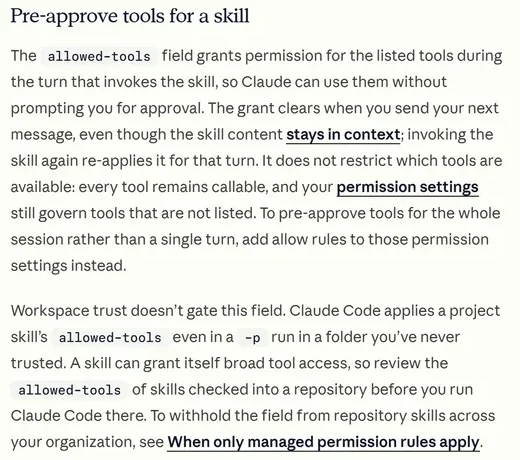 Figure 6: What the official docs say about
allowed-tools (source: code.claude.com)
I opened that section, and it says two things. First, allowed-tools lets the listed tools run without asking you, for the turn in which the skill is invoked; it doesn’t restrict other tools, and the grant clears once you send your next message. Second, workspace trust doesn’t gate this field: even in a folder you’ve never trusted, Claude Code applies a project skill’s allowed-tools, including in non-interactive mode with -p. In the docs’ own words, a skill can grant itself broad tool access, so before running Claude Code in a repository, look at what allowed-tools its skills declare.
This is the same class of problem as prompt injection: a skill’s content is instructions for Claude, so whoever wrote the skill is effectively giving your Claude orders. The Anthropic engineering blog’s advice is blunt: install skills only from trusted sources, and when a source is less trusted, audit it thoroughly before use, including bundled code, dependencies, and any instructions that connect to external networks.
The two third-party recommendation posts I read, from Composio (15 June) and Krater, were both written by vendors selling their own products, and each puts its own skills near the top. The Composio post does say one honest thing, though: most skills are useless, and besides polluting your context window, they can introduce security risks. I agree with that.
How to choose? Start from what you do
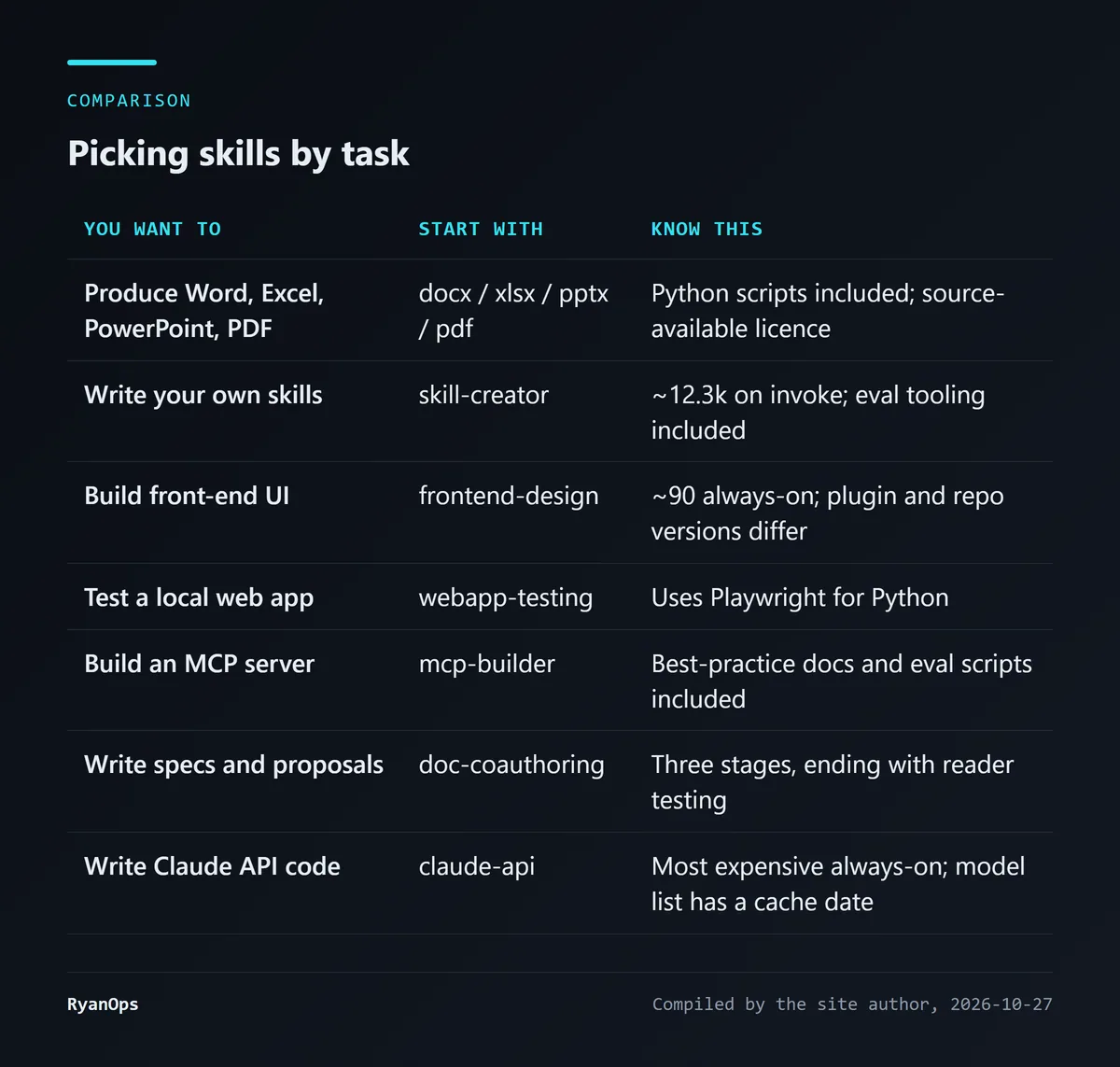 Figure 7: My picks, based on the analysis above
My advice is the same as in the plugin piece: install only what you’ll actually use this week. A skill’s always-on cost is smaller than a plugin’s, but it adds up just the same; my own 20 are the proof.
If you only install one, I’d pick skill-creator. The official skills are, in the end, someone else’s workflow. Using skill-creator to turn the things you do over and over into a skill usually pays back more than any ready-made one. When you write it, remember three things: put the most important use first in the description, add disable-model-invocation to anything with side effects, and split files once you pass 500 lines.


