Spend Claude Max's free API credits with Cline
Claude Max includes $100-$200 a month in API credits that Claude Code cannot use. How to spend them in VS Code with Cline and an API key, and three traps.
On October 7, 2026, Anthropic announced a monthly allowance of API credits for Claude Max and Team subscribers (the date is from Neoteo’s report; the Help Center says the rollout takes a few days): $100 a month on Max 5x and $200 a month on Max 20x. No card is required, and whatever you don’t use by the end of the cycle expires.
The catch is that most people on Max are paying for it to write code, and the first tool they reach for is Claude Code. The Help Center is explicit: these credits cannot be used for interactive Claude Code, whether in the terminal, an IDE, the desktop app or the web.
So where does the $100 go? One practical answer is Cline in VS Code. It is an open source coding agent extension that accepts an Anthropic API key directly and talks to the Claude API, which sits squarely inside what the credits cover.
This is a step-by-step setup guide, plus three traps I put together by checking the official rules. It rests on three sources: the Claude Help Center article “Monthly API credits for Max and Team plans”, Cline’s official Anthropic setup page, and the Claude Platform pricing page, all of which I opened and checked on October 15. The two Cline screenshots in this piece were taken by this site’s author in their own VS Code. I did not run through the claiming flow again while writing, so the claiming steps follow the Help Center’s text and are not a record of my own clicks.
What are the credits, and who gets them?
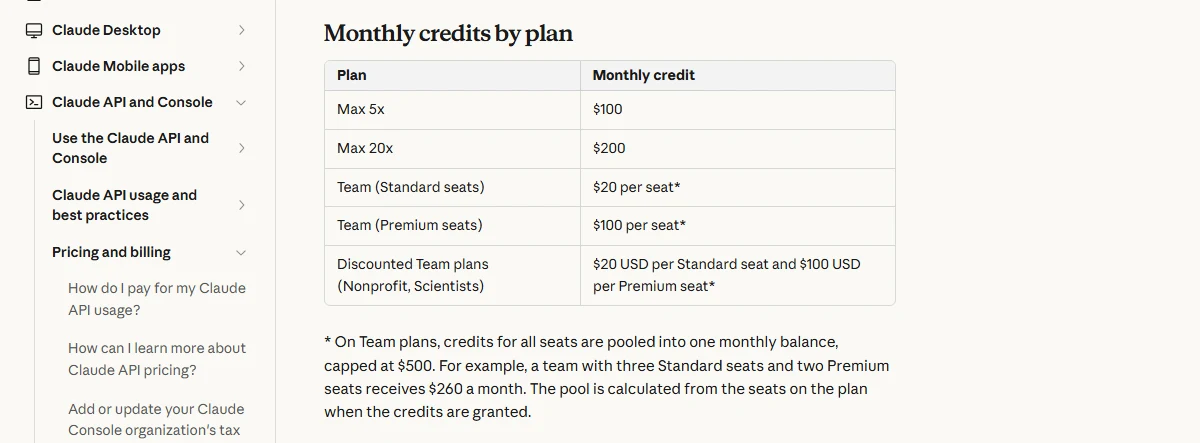 Figure 1: Monthly credits by plan (source: Claude Help Center)
Start with the table. Among personal plans only Max qualifies: $100 a month on 5x and $200 a month on 20x. Team is calculated per seat, $20 for a Standard seat and $100 for a Premium seat, all pooled into one balance capped at $500. The Help Center’s example is three Standard seats plus two Premium seats, which comes to $260 a month. Free, Pro and Enterprise are not eligible.
There are a few conditions:
- The plan must be active, and new subscribers have to be on it for seven days before they can claim.
- You don’t need to add a payment method on Claude Platform to claim or use the credits.
- Subscriptions bought on iOS or Android count, but claiming has to be done on claude.ai in a web browser.
The rules on how the credits behave matter more than the amounts. I list them here because each of the traps later comes back to one of them:
- They refresh every billing cycle. They arrive shortly after your plan payment goes through, and annual plans receive them monthly.
- They don’t roll over. Unused credits expire at the end of each cycle.
- They’re used first. These credits are spent before any credits you’ve bought.
- They’re shared across the organization. Everyone with an API key in the linked Console organization draws from the same balance.
- They’re separate from your plan limits. They don’t add to your usage in Claude, Claude Code or Cowork.
So the nature of this money is clear: a monthly sum that disappears if unused and only works on Claude Platform. For anyone who writes code, leaving it untouched is simply waste.
Why can’t you just use Claude Code?
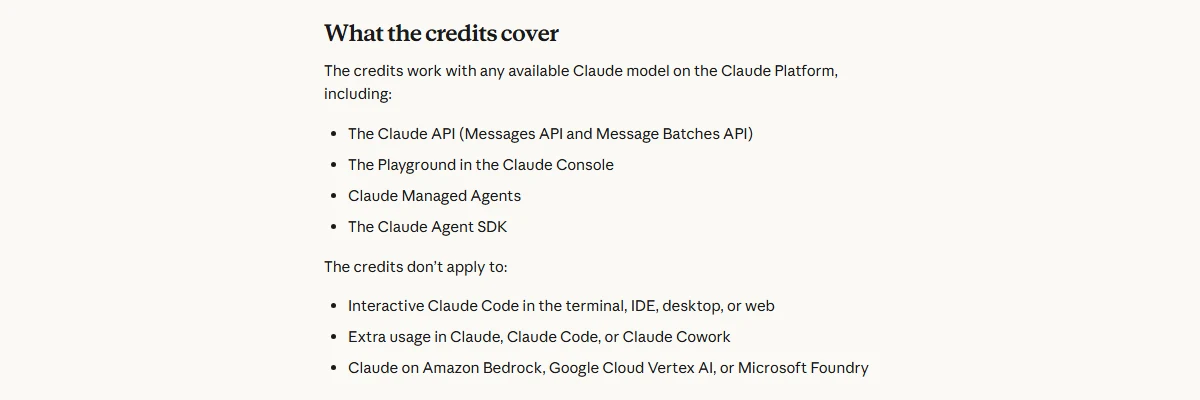 Figure 2: Where the credits can and can’t be used (source: Claude Help Center)
What’s covered is the Claude API (the Messages API and the Message Batches API), the Playground in the Console, Claude Managed Agents, and the Claude Agent SDK.
Three things are not: interactive Claude Code in the terminal, an IDE, the desktop app or the web; extra usage in Claude, Claude Code or Cowork; and Claude on Amazon Bedrock, Google Cloud Vertex AI or Microsoft Foundry.
The Help Center’s FAQ spells out the reasoning: the credits are for building your own apps and agents on Claude Platform, so they don’t cover interactive Claude Code sessions or extra usage after you hit your plan’s limits.
There’s also a fine-grained rule about claude -p. If you run claude -p or the Agent SDK with an API key from the linked organization, that counts as Agent SDK usage and the credits apply. If you’re signed in with your subscription instead, it still draws from your plan’s usage limits. But runs started by the Claude Code GitHub Action, an IDE extension or the desktop app always count as Claude Code usage, so the credits don’t cover them, even with -p.
In other words, the official Claude Code extension in VS Code can’t touch this money however you configure it. To use the credits inside VS Code you need a different tool that talks to the Claude API. Cline is one with a lot of installs: its Marketplace page shows more than 5.6 million.
Step 1: Claim the credits into a Console organization
The credits don’t appear in your API account by themselves. You first link your subscription to a Claude Console organization. The Help Center describes the flow like this:
- On claude.ai, open Settings > Billing. On a Team plan it’s Organization settings > Billing, and an Owner or Primary Owner has to do it.
- In the API credits section, select “Link organization”.
- Choose the Console organization that should receive the credits, or create a new one on the spot.
- Review the Supplemental Credit Terms, then link.
- The credits appear in that organization’s balance.
On permissions, you need the Owner, Admin or Billing role in the Console organization. If you don’t have a Console account yet, you can create one during the claim flow or open one first at platform.claude.com. The Help Center suggests signing in to the Console with the same email you use on claude.ai, and if the linking flow keeps failing, trying again in a few hours.
There’s one thing to settle before this step: a subscription can be linked to only one Console organization, and you can’t change it yourself. The Help Center says you’d have to contact support. So if you already have a Console organization for work or a project, think about whether you want your personal credits to land there, because it bears directly on the third trap below. My own advice is to open a clean organization just for these credits.
Also, the credits are being rolled out over a few days. If you’ve been subscribed for more than seven days and have the right role but still don’t see the section, the Help Center says you may simply not have been reached yet, and to contact support only if you’re sure you’re eligible.
Step 2: Create an API key in the same organization
Cline’s docs give a short process for creating a key:
- Sign in to the Claude Console.
- Go to the API keys page.
- Click “Create Key” and give it a name that says what it’s for, such as “Cline”.
- Copy the key immediately. The docs stress that you won’t be able to see it again.
The point that matters is “the same organization”. The credits exist only in the linked organization. If your Console account has several organizations and you create the key in a different one, Cline will run perfectly well while charging that other organization, and the free credits won’t move a cent. Check which organization Console currently has selected before you create the key.
Guard the key itself as well. The Help Center notes that every key in the organization draws from the same balance. If a key leaks, what others spend comes out of your credits, and potentially your own prepaid money. Don’t paste it into code or push it to git.
Step 3: Install Cline in VS Code
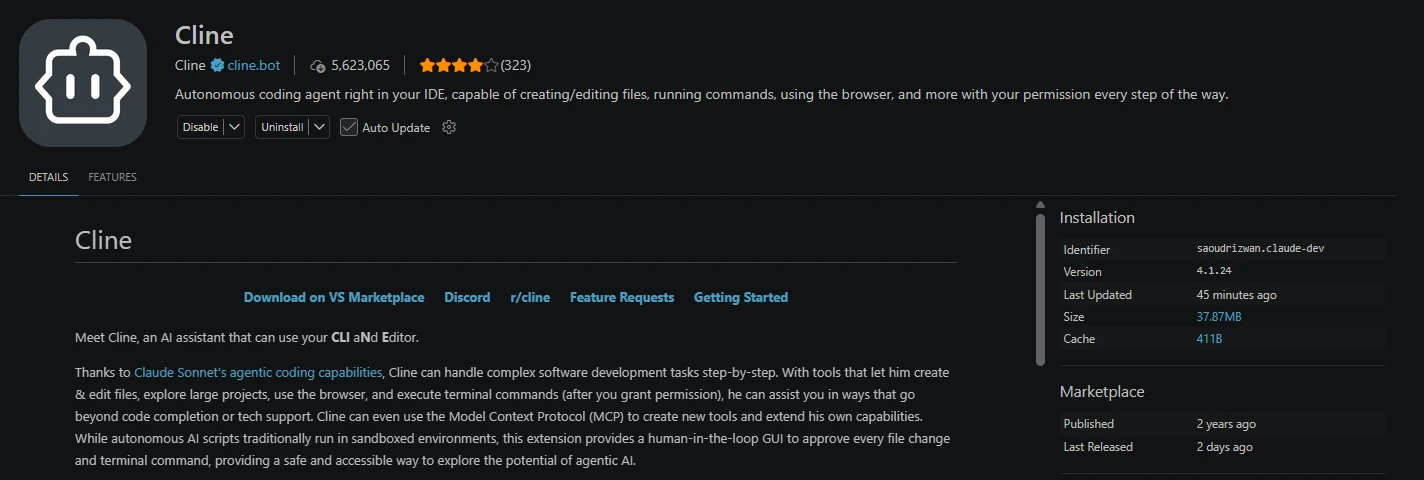 Figure 3: Cline’s page in the VS Code extension marketplace, captured by this site’s author on October 15, 2026 (source: VS Code Marketplace)
Open Extensions on the left side of VS Code and search for “Cline”. Check three things so you don’t install a lookalike: the publisher is cline.bot with a blue verified tick, and the identifier is saoudrizwan.claude-dev. At the time of the screenshot the version was 4.1.24, with 5,623,065 installs.
The “claude-dev” in the identifier is Cline’s original name. It was first written to connect to Claude’s API, and the marketplace description still carries the line “Thanks to Claude Sonnet’s agentic coding capabilities”.
Once installed, a robot icon appears on the left. Click it to open the Cline panel. It’s a coding agent: it reads your project, edits files and runs commands in the terminal, asking for your approval at each step by default.
The panel may show a “Try ClinePass” promotion. That’s Cline’s own monthly plan focused on open-weight models, and it has nothing to do with this setup. Close it, and don’t click “Switch to ClinePass provider”.
Step 4: Choose Anthropic as the provider, not Claude Code
This is the most important step in the guide, and the first trap.
 Figure 4: The two Anthropic paths in Cline’s docs (source: Cline Docs)
Cline’s docs split Anthropic into two paths. “Anthropic API” uses an API key. “Claude Code” uses your Max or Pro subscription through the Claude CLI. Under the Claude Code path the docs say it uses your subscription limits instead of API token billing.
For someone on Max, the second path looks convenient, and choosing it does work. But it draws on your subscription, and has nothing to do with the free API credits. With the two options side by side, it’s the easiest one to get wrong.
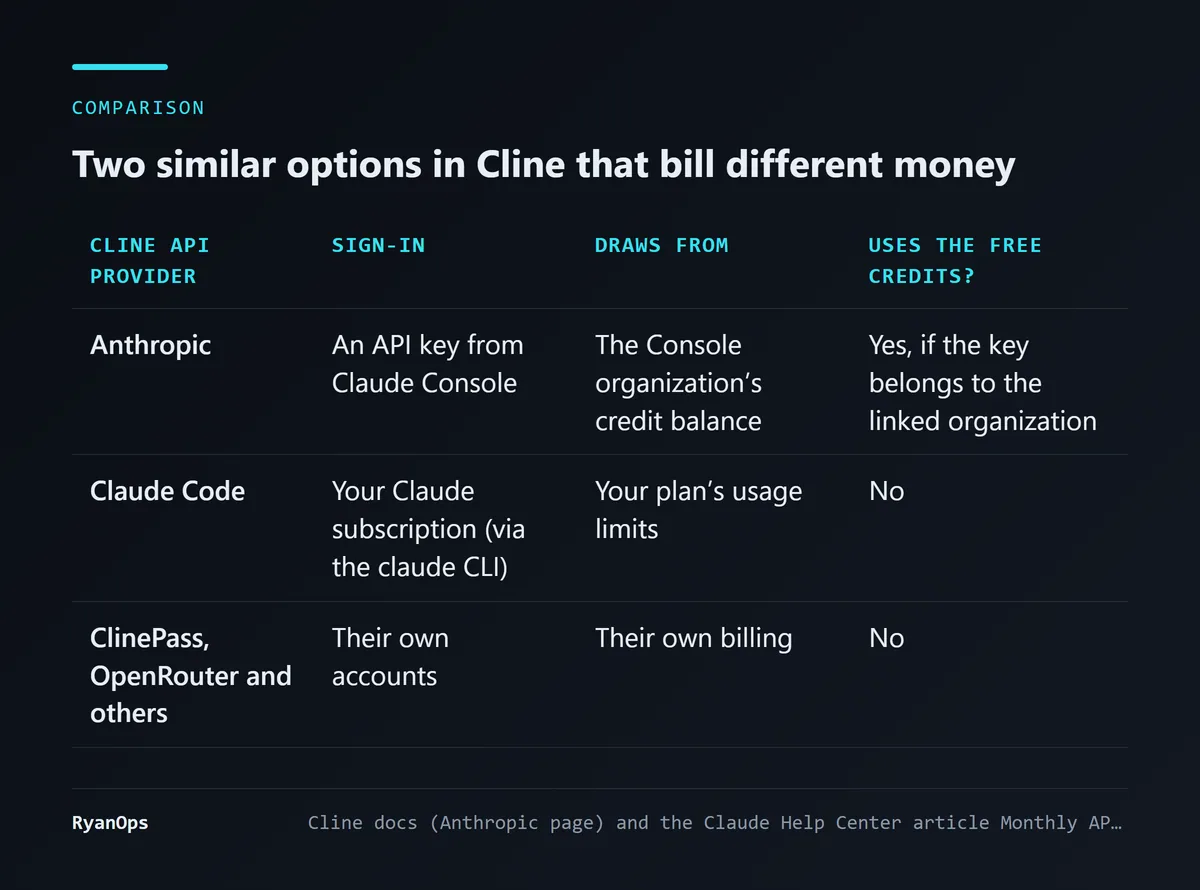 Figure 5: Whose money each option spends (data: Cline Docs, Claude Help Center)
The correct setup, following Cline’s docs:
- Click the gear icon at the top right of the Cline panel to open settings.
- In the “API Provider” dropdown, choose Anthropic.
- Paste the key from Step 2 into the “Anthropic API Key” field.
- Choose a model in the “Model” menu.
- Leave “Use custom base URL” unticked. The docs say most users won’t need it.
Below the model there’s an “Enable Extended Thinking” checkbox. Cline’s docs point out that if you enable it, you’re billed for the full thinking tokens, not just the length of the summary shown on screen. To stretch the credits, leave it off for simple tasks.
Once that’s done, give Cline a small task, such as explaining a file. Then go back to the usage page in the Console and see whether an API usage entry appears. If the usage shows up in the linked organization and the balance that dropped is the free one, you’ve wired it correctly.
One task cost $48: how long will the credits last?
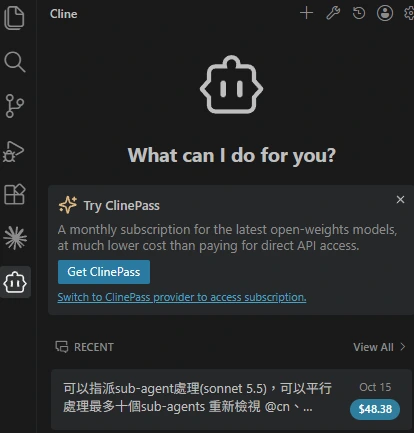 Figure 6: Recent tasks in the Cline panel; the amount is Cline’s cost estimate for that task. Captured by this site’s author on October 15, 2026
This is a screenshot of the author’s Cline panel. The recent task is a job that “assigns up to ten Sonnet 5.5 subagents to review in parallel”, and Cline lists its cost next to it as $48.38. I can’t tell from the screenshot which provider that task ran through, but it shows one thing: running large, parallel agent tasks in Cline can burn half of a Max 5x month’s credits in one go.
That’s the consequence of credits priced like the API. A subscription is metered by usage limits, and when you hit one you wait. The API charges for every token. The glossary covers the basics of token pricing. I put the numbers from the Claude Platform pricing page into a table.
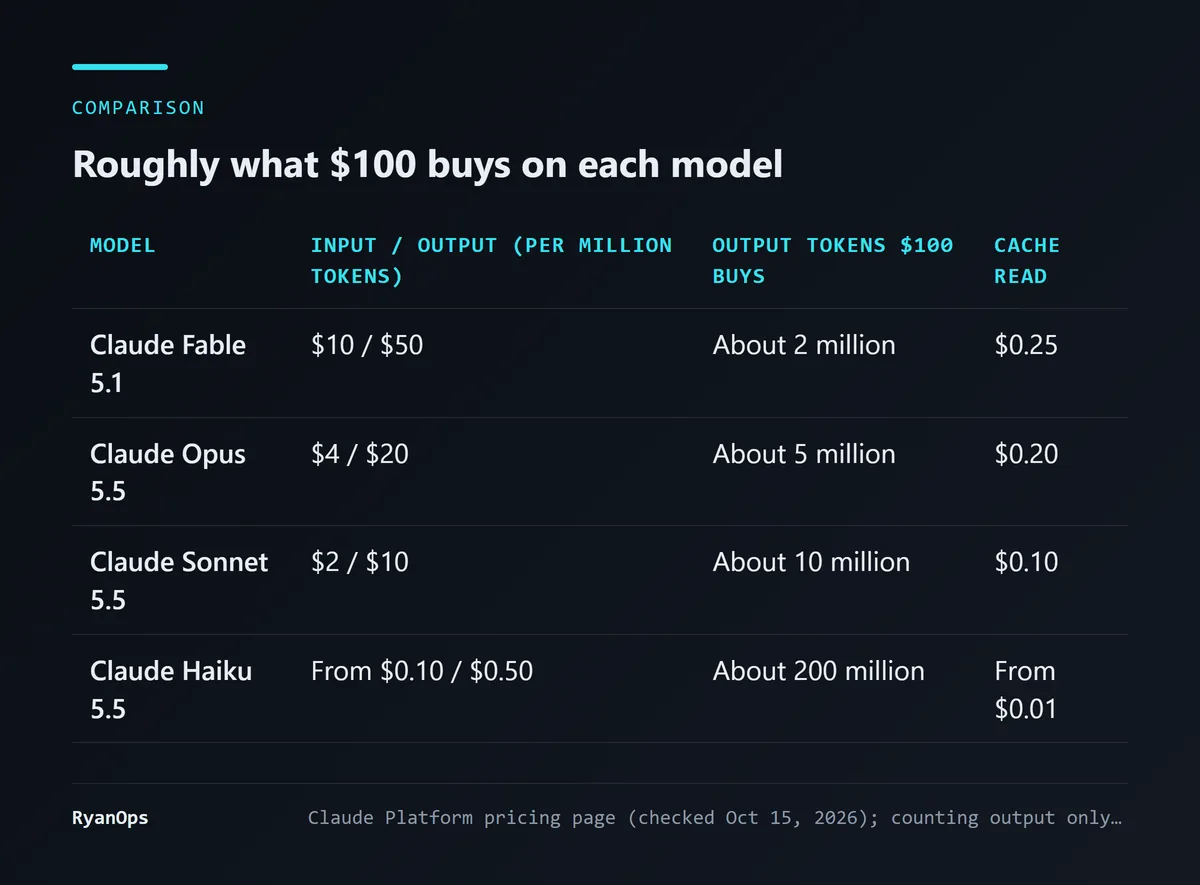 Figure 7: Each model’s price and what $100 buys (data: Claude Platform Pricing)
Per million tokens: Fable 5.1 is $10 input and $50 output; Opus 5.5 is $4 and $20; Sonnet 5.5 is $2 and $10; Haiku 5.5 starts at $0.10 and $0.50. Counting output alone, $100 buys about 5 million tokens on Opus 5.5 and about 10 million on Sonnet 5.5.
The table is simplified. Most of a coding agent’s bill is input: every turn sends the conversation history, the files it has read and the tool results back in. So how long the credits last depends mainly on the cache-read price. Opus 5.5 is $0.20 per million and Sonnet 5.5 is $0.10, twenty times cheaper than ordinary input. Long sessions on the same project save more the higher the cache hit rate. This site has a piece on how Opus 5.5’s pricing works out, with a way to estimate a bill from the share of cache reads.
My own advice: use Sonnet 5.5 for everyday tasks, switch to Opus 5.5 only when you’re genuinely stuck, and save the many-parallel-subagents approach for the end of the month if credits are left over. A $48 task twice a month and they’re gone.
The three easiest traps to fall into
Two have come up already. Here they are together, plus the most expensive one.
Trap one: choosing Claude Code as the provider. The settings work and tasks run, but they draw on your subscription limits, and the free credits expire untouched at the end of the month. Check by looking for entries on the Console’s usage page.
Trap two: creating the key in a different organization. The credits live only in the one linked organization, and you can’t change the link yourself. A key created in another organization charges that organization’s money.
Trap three: being charged once the credits run out. This is the expensive one. The Help Center is clear: if the organization has credits you’ve bought or auto-reload switched on, usage continues against those once the free credits are gone, and nothing stops. Only when the organization has no other credits do API requests stop until next month’s credits arrive. And because the free credits are “used first”, you may well not notice the day it switches over to your own money.
If you link the credits to an organization that already has a prepaid balance and auto-reload, run a $48 task like the one above a few times and the rest is on you. To make it a hard cap, there are two options: link a new organization with no prepaid balance and no auto-reload, or cap it with workspace spend limits in the Console, which the Help Center mentions in its Team section as a way to limit usage by project or person.
One more thing: when the credits run out and requests are blocked, Cline reports an API error. If you see a message about insufficient credit, don’t rush to top up. First decide whether you really want to spend that money this month.
My read, and what would change it
If you already subscribe to Max and write code in VS Code, I think this is worth ten minutes of setup. The money is already included in what you pay each month, and it isn’t refunded when it expires.
But I wouldn’t upgrade to Max for these credits. $100 of API credits goes quickly on heavy agent tasks with Opus 5.5, and the gap between Max 5x and Pro should still be judged mainly on the subscription’s own usage limits. The credits are more like a bundled trial fund, a chance to run third-party tools on API pricing and see how it goes.
Cline isn’t the only option, either. In principle any tool that accepts an Anthropic API key and calls the Claude API can use these credits. I chose it for this guide because it has a very high install count on the VS Code Marketplace, and its official docs separate the two Anthropic paths clearly.
What would change my view? If Anthropic changes the rules so the credits can be used in Claude Code, the whole premise of this guide disappears and you’d just use the official extension. If Cline’s Anthropic path turns out noticeably worse than the official extension, for instance with cache hit rates so low the credits don’t last a week, it would be time to switch tools. Conversely, if real bills show that $100 a month is plenty for typical users, my cautious “start with Sonnet” advice could relax a little.
One last reminder of the step people most often skip: after setting up, go to the Console and confirm that the balance going down is the free one. Do that, and every trap above shows itself.


