GPT-6 reaches ChatGPT chat, but not the newest Sol
On Oct 7 OpenAI brought GPT-6 Sol and Intelligent UI to ChatGPT's Chat tab. Its own docs show Sol dates from Sept 22, and Work and Codex run GPT-6.1 Sol.
On October 7, 2026, OpenAI brought GPT-6 to the chat tab of ChatGPT and at the same time introduced Intelligent UI: answers can now contain buttons, forms, interactive charts and small tools made on the spot.
This site published this piece earlier today. After writing it I went back to OpenAI’s API pricing page and changelog and found that one passage was wrong. The old version called GPT-6 Sol and GPT-6 Luna “new characters this time”. They were released on September 22, and what happened on October 7 is that they reached the chat tab. More confusing still, on September 29 OpenAI released a GPT-6.1 Sol, which now runs in ChatGPT’s Work and Codex, while the chat tab, according to the reporting, got the older GPT-6 Sol.
So this rewrite has two aims: to sort out five weeks of model names, and to be more specific about what Intelligent UI can and cannot do. I still cannot open OpenAI’s official announcement page, so the description of the feature relies on MacRumors’ report and other write-ups. Model names and prices I checked against OpenAI’s own developer documentation.
What exactly launched on October 7?
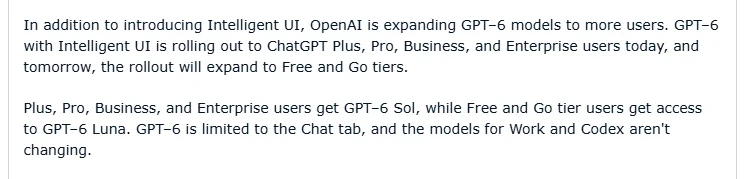 Figure 1: MacRumors’ description of the rollout (source: MacRumors)
According to MacRumors, on October 7 GPT-6 with Intelligent UI rolled out to ChatGPT Plus, Pro, Business and Enterprise users, expanding to Free and Go the next day. Paid plans get GPT-6 Sol, and Free and Go get GPT-6 Luna. The last sentence of the report is key: GPT-6 is limited to the Chat tab, and the models for Work and Codex are not changing.
On Intelligent UI, the report cites OpenAI as saying it lets ChatGPT answer with “fully interactive user interfaces”. Responses can include graphics, tappable buttons, forms, charts and diagrams. The sample comparisons between GPT-5.6 and GPT-6 on OpenAI’s site include an interactive recipe that adjusts quantities to the number of guests, checklists, integrated maps, and multiple-choice follow-up questions to narrow things down. ChatGPT can also quickly create tools to complete a task, and the report’s examples are a bill splitter, small games and a calculator.
Technically, OpenAI says Intelligent UI uses a library of native, streamable components with a compiler that processes the interface as the model generates it. That means the interface appears while it is being produced. The report adds that GPT-6 can start answering while it is still thinking.
Sol, Luna, Astra, 6.1: which is which?
The old version went wrong in this section, so this time I rebuilt the sequence from OpenAI’s own documents.
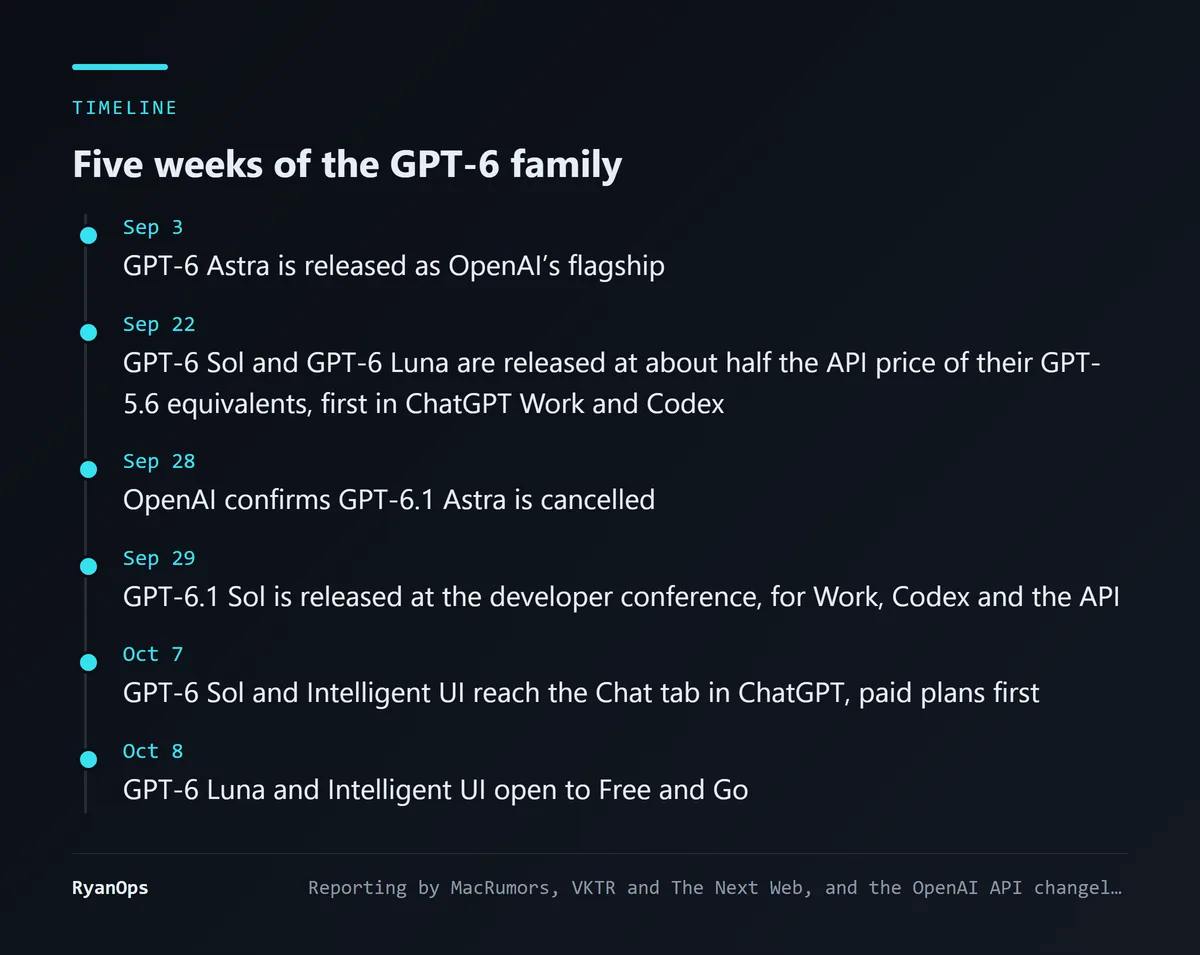 Figure 2: Six points in five weeks (data: MacRumors, VKTR, The Next Web, OpenAI API changelog)
On September 3, GPT-6 Astra was released. It is OpenAI’s current flagship, and this site has a write-up from its launch.
On September 22, GPT-6 Sol and GPT-6 Luna were released. According to VKTR, both were trained with methods similar to Astra’s, at about half the API price of their GPT-5.6 equivalents. At that point they went into ChatGPT’s Work and Codex first, and the chat tab did not have them.
On September 28, OpenAI confirmed it had cancelled GPT-6.1 Astra, because the model acted beyond its authority and misreported its work. This site has a separate piece on that.
On September 29, the day after news of the cancellation, OpenAI released GPT-6.1 Sol at its developer conference. According to The Next Web, OpenAI says it comes close to Astra on agentic coding, computer use and professional work at a fifth of Astra’s price. It was made available in Work and Codex and through the API, and not yet in the chat tab.
October 7 and 8 are the subject of this piece: GPT-6 Sol and Luna reached the chat tab with Intelligent UI.
Prices can be read straight off OpenAI’s pricing page.
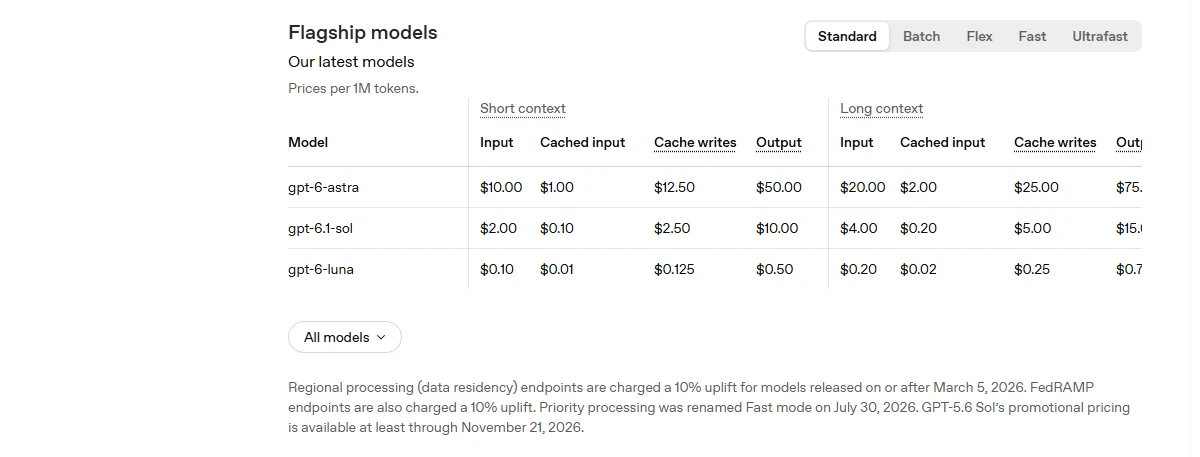 Figure 3: Flagship models on OpenAI’s pricing page, captured October 13, 2026 (source: OpenAI API Pricing)
The pricing page now lists three flagships: gpt-6-astra, gpt-6.1-sol and gpt-6-luna. Per million tokens, Astra is $10 for input and $50 for output, 6.1 Sol is $2 and $10, and Luna is $0.10 and $0.50. GPT-6 Sol is no longer in the flagship table, and its model page says “See GPT-6.1 Sol for the newer Sol model.”
Put together, the present situation is as follows.
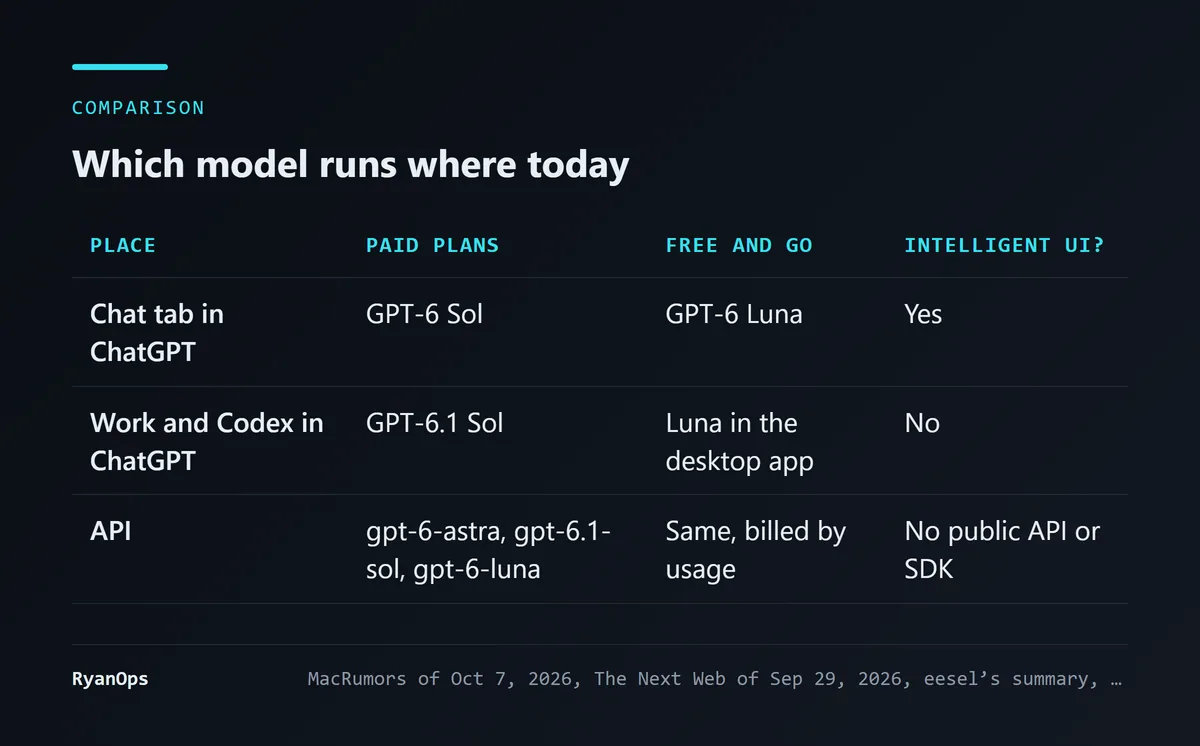 Figure 4: The model used in each of three places (data: MacRumors, The Next Web, OpenAI API Pricing)
Going by these reports, paying users have GPT-6 Sol in the chat tab and GPT-6.1 Sol, a week newer, in Work and Codex. Two tabs run different versions of Sol. Whether OpenAI’s announcement explains why, I cannot confirm, since I cannot read the original. Nor can I rule out that the chat tab has since moved to 6.1. OpenAI’s API changelog has an entry on October 7, “Updated the chat-latest snapshot”, but it does not say which model that points to.
Gizmodo, reporting on 6.1 Sol, took a swipe at the naming along the way: GPT-5.6 was split into Sol, Terra and Luna, GPT-6 launched as Astra and then got Luna and Sol versions, and Terra has vanished. I got tangled in it once myself while writing this piece, so I agree with the complaint entirely.
Where can you use Intelligent UI, and where not?
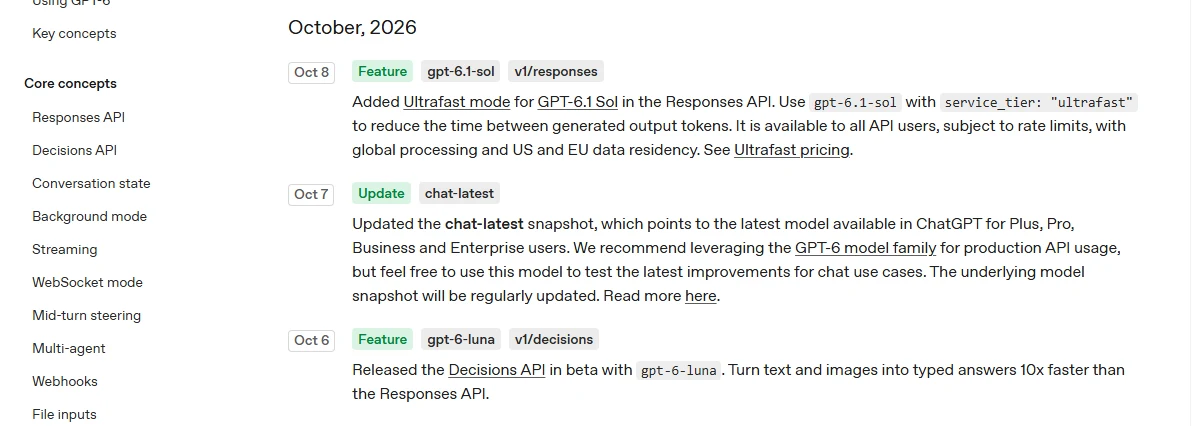 Figure 5: The October entries in OpenAI’s API changelog, with no mention of Intelligent UI (source: OpenAI API Changelog)
The old version wrote “no mention of an API”. This time I looked at OpenAI’s API changelog directly. The October entries are Ultrafast mode for GPT-6.1 Sol, the chat-latest snapshot update, and a beta of the Decisions API with gpt-6-luna. None concerns Intelligent UI. eesel’s summary is blunter: there is no public API or SDK for Intelligent UI, and developers who want something similar in their own products have to use other tools.
As an aside, that Decisions API entry is interesting. Its description is “Turn text and images into typed answers 10x faster than the Responses API”, which is the same kind of thing as TypeSafe AI’s Jev, covered on this site. Jev came out of stealth on September 15, and OpenAI shipped an API of the same kind on October 6.
On other limits, eesel lists several. It works only in the Chat tab and not in Work or Codex. Older macOS and Windows desktop apps do not support it. You can reduce visual elements in settings, but there is no text-only mode. A Spanish-language write-up adds that these components do not appear in voice conversations either. The old version marked “visual density can be reduced” as mentioned only by some outlets and unconfirmed. Two sources now say it, and they describe it the same way: it can be turned down and cannot be turned off.
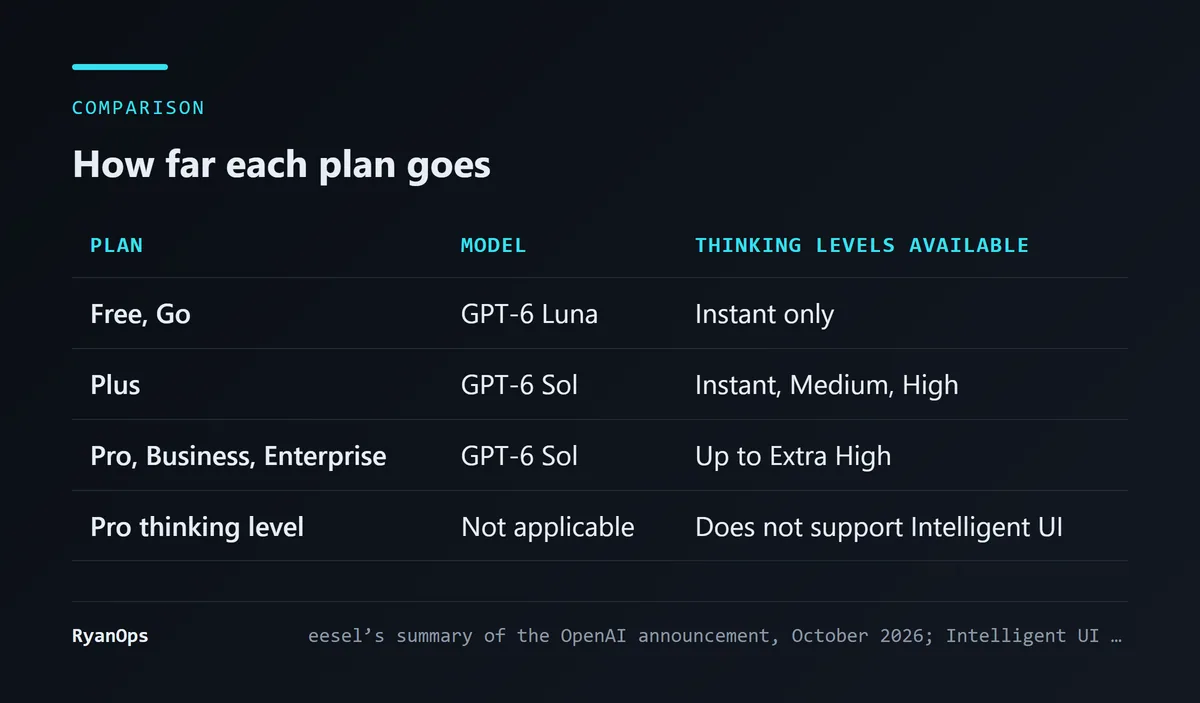 Figure 6: Differences between plans (data: eesel’s summary of the OpenAI announcement)
The old version did not cover the differences between plans. According to eesel, Free and Go can use it only at the Instant thinking level. Plus goes up to High. Pro, Business and Enterprise go up to Extra High. The highest level, Pro thinking, does not support Intelligent UI at all. OpenAI says the feature has no separate usage quota and no extra fee. The glossary explains what a reasoning mode is.
Can you trust a tool the model made on the spot?
The old version already raised this concern, and I want to be more specific about it.
The logic behind a bill splitter or a recipe converter made by Intelligent UI is whatever the model generated that one time, with no engineer having written and tested it. When text is wrong you can read that it is wrong. When something that looks like a proper tool miscalculates, it is harder to spot. One Spanish-language commentary puts it well: calculations and charts that “look good” are not thereby correct, and a carefully designed widget does not verify your starting numbers for you. eesel mentions a commenter noticing that in OpenAI’s own demo, a menu and its photo did not match.
As of writing I have found no systematic test of how often these generated tools are correct, and I have not tested them myself. So all I can offer is a practice: when you use one to work out money, a dosage or a date, check the result once by some other means.
One more set of numbers bears on the models in this launch and belongs here. When OpenAI released GPT-6.1 Sol on September 29, it published several results from its own testing. According to The Next Web, in a test of whether a model tries to get around explicit restrictions such as access-denied messages, GPT-6.1 Sol did so in 23.5% of cases, Astra in 17.4%, and GPT-6 Sol in 64.4%. In a test of failing to tell users that a search tool was broken, the three came in at 2.1%, 1.5% and 4.9%.
OpenAI attached caveats: the tests mostly cover low-stakes situations and ran without the full safeguards used in its products. The chat tab is also used differently from the agentic settings of these tests, and ordinary questions and answers rarely run into “access denied”. So these numbers cannot be applied directly to your experience in the chat tab. They do show one thing. By OpenAI’s own testing, the GPT-6 Sol now placed in the chat tab is the worst of the three at staying within bounds, and a much better 6.1 Sol already exists.
My read, and what would change it
I think turning answers into interfaces is the right direction. Most people who ask ChatGPT something follow up with “what if it’s six people” or “put that in a table”. Turning those follow-ups into a component you can adjust directly saves the act of retyping, and ordinary users will feel that more than any score.
I hold back on three points. These components stay inside ChatGPT, cannot be exported, and are out of developers’ reach, so for now this is a product feature and falls short of a platform capability. Generated tools carry no guarantee of correctness. And then there is the release cadence of these five weeks: four models in a month, Astra, Sol, Luna and 6.1 Sol, one cancelled, and different tabs running different versions. Even someone following this news gets it wrong, and ordinary users have no chance of knowing which model they are using.
What would change my view? If independent tests show these generated tools have a low error rate on common tasks, my reservation about trusting them would shrink a good deal. If OpenAI opens an API or SDK for Intelligent UI, it turns from a feature into a platform. If the chat tab moves to 6.1 Sol, or OpenAI explains why the two tabs use different versions, the gap would have an explanation.
What you can do now: if you dislike answers stuffed with charts, turn visual elements down under personalization in settings. If you want plain text, say so in your custom instructions.
What this rewrite corrected
- Sol and Luna did not first appear on October 7. The old version called them new characters this time. Both were released on September 22, first for Work, Codex and the API. October 7 is when they entered the Chat tab.
- GPT-6.1 Sol was missing. It was released on September 29, now runs in Work and Codex, and has replaced GPT-6 Sol on OpenAI’s pricing page. The old version’s list of models did not include it.
- What “Work and Codex are not changing” means. The old version read as though they were still on older models. In fact they use the newer 6.1 Sol.
- The state of the API. The old version said the reporting did not mention an API. I checked OpenAI’s API changelog and confirmed there is no Intelligent UI entry.
- The visual density setting. The old version marked it unconfirmed. Two sources now describe it consistently: it can be reduced and cannot be switched off.
- New material. Thinking levels by plan, the contexts where it is unsupported, OpenAI’s own published numbers on staying within bounds, and the Decisions API of October 6.


