MySQL Database Partitioning: A Complete Guide
The MySQL 8.4 partitioning chapter, read end to end: which type to pick, when pruning fails, the unique-key and foreign-key limits, and life without INTERVAL.
Picture a table holding three years of orders, a little over two hundred million rows. The nightly cleanup job runs DELETE FROM orders WHERE created_at < '2023-01-01', the table stays locked until the morning shift is at their desks, and the binlog fills the disk on the way.
That’s the classic moment partitioning shows up. This guide goes from what it is all the way to when you shouldn’t use it. While writing it I reread the partitioning chapter of the MySQL 8.4 manual page by page and checked the PostgreSQL docs as well, so every limit below comes with its source. In two places the manual says something different from what I’d previously written, and I’ll say exactly what changed.
What is partitioning actually solving?
The manual’s definition is blunt: this is horizontal partitioning, which assigns the rows of one table to different physical partitions by rule. Each partition is its own chunk on the filesystem, but logically it is still one table, and your SQL doesn’t change by a single character.
One thing that gets muddled a lot: MySQL does not support vertical partitioning, meaning splitting different columns into different storage. Plenty of articles blur the two. They’re separate ideas.
There are three places it earns its keep.
First, a single table can hold more data than one disk.
Second, deleting old data gets very cheap. Instead of running DELETE over two hundred million rows you run ALTER TABLE ... DROP PARTITION on a whole partition, which amounts to removing the underlying file and doesn’t generate a mountain of undo log and binlog. The manual adds a small detail here: you need the DROP privilege on the table, and the server does not report how many rows went away.
Third, partition pruning. When a query’s WHERE clause hits the partitioning key, MySQL skips the partitions that can’t match and scans only the relevant ones.
Can every table be partitioned?
No. Since MySQL 8.0, only the InnoDB and NDB storage engines support partitioning. MyISAM, MERGE, CSV and FEDERATED are all out. Every partition of a partitioned table must also use the same engine.
If your project still carries a few old MyISAM tables, step one is finding out whether they can move to InnoDB. It’s an easy prerequisite to skip, and you then discover it at the ALTER TABLE step.
Four partition types — which one do you want?
I opened the manual’s “Partitioning Types” page. It covers all four in four paragraphs:
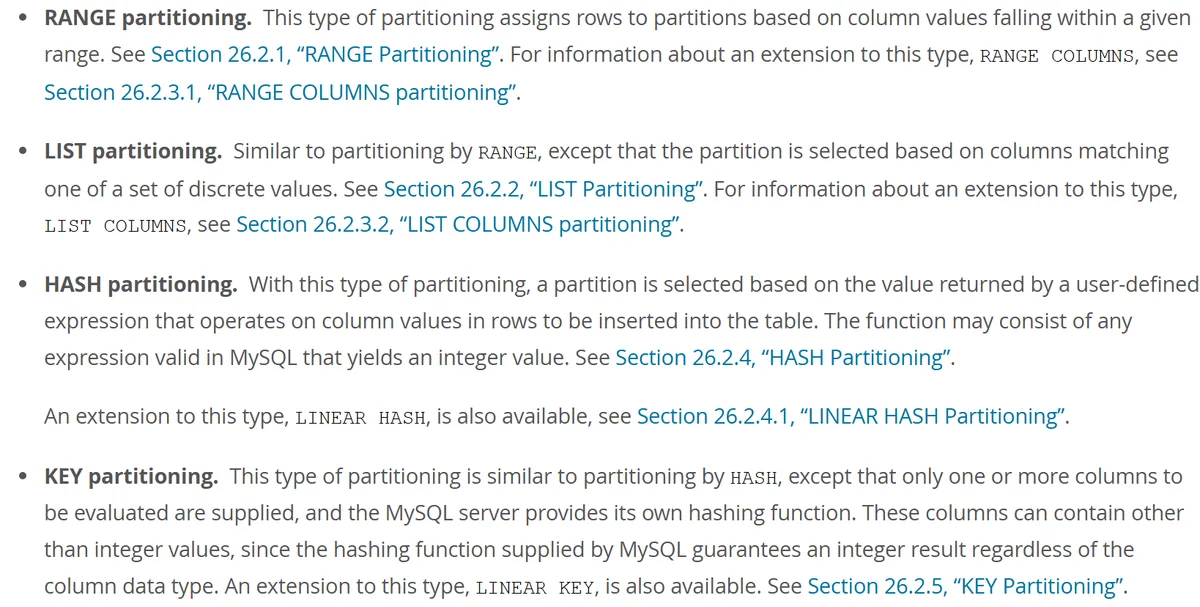 Figure: the type list on the “Partitioning Types” page of the MySQL 8.4 Reference Manual (source: dev.mysql.com)
That text is written for people who already know. Reframed as a selection question, here’s how I’d lay it out:
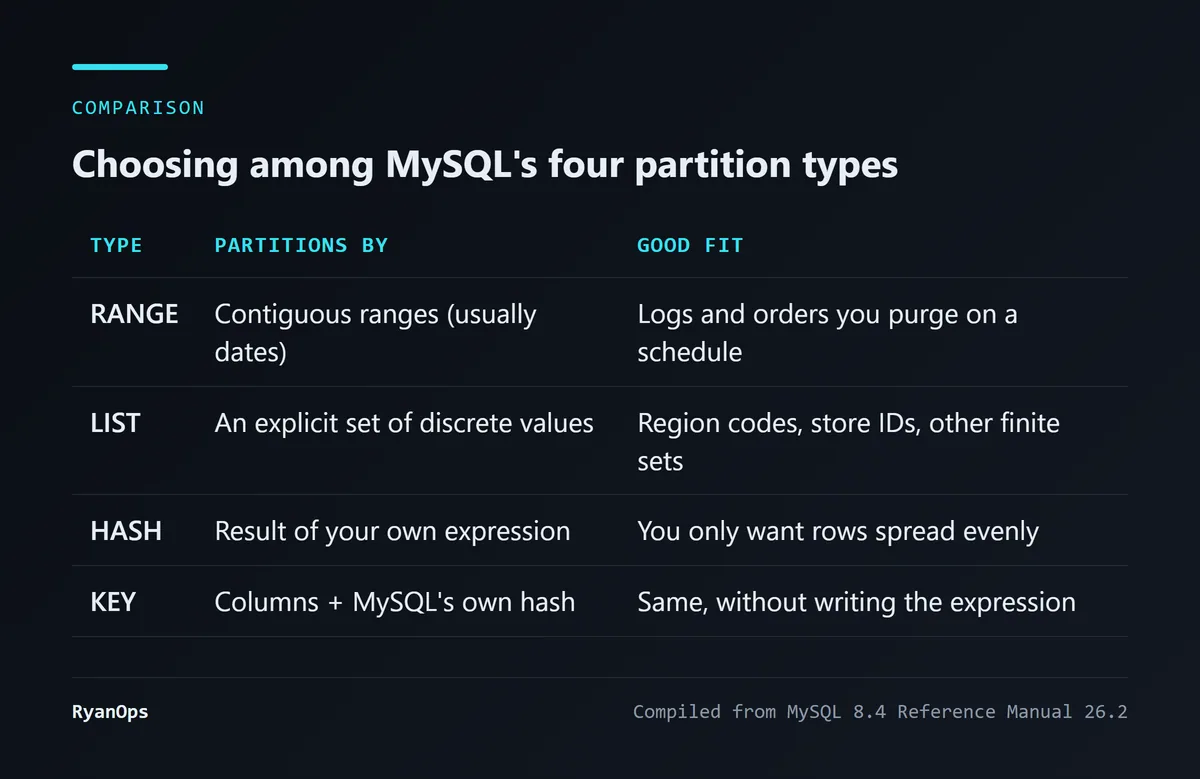 Figure: choosing among the four partition types (compiled for this article from MySQL 8.4 Reference Manual 26.2)
RANGE: the default answer for time-series data
RANGE splits data by ranges of a column value, most often dates by month or year:
CREATE TABLE orders (
    id INT NOT NULL,
    created_at DATE NOT NULL,
    amount DECIMAL(10,2),
    PRIMARY KEY (id, created_at)
)
PARTITION BY RANGE (YEAR(created_at)) (
    PARTITION p2024 VALUES LESS THAN (2025),
    PARTITION p2025 VALUES LESS THAN (2026),
    PARTITION p2026 VALUES LESS THAN (2027),
    PARTITION pmax VALUES LESS THAN MAXVALUE
);
Logs, orders, transaction records — data where newer rows get queried more and older rows should go away — almost always end up here. A variant called RANGE COLUMNS lets you define ranges directly on multiple columns and non-integer types (DATE, VARCHAR) without first converting to an integer through a function.
LIST: finite, known categories
The logic resembles RANGE, except the basis is an explicitly listed set of discrete values. It suits things like region codes or store IDs. There’s a LIST COLUMNS variant too.
HASH and KEY: I just want the rows spread out
If what you want is even distribution so no single partition runs hot, HASH computes the partition from an expression you supply (HASH(id), say). KEY is less work: you name the columns and MySQL supplies the hashing function. Both have a LINEAR variant, which makes redistributing rows cheaper when you change the partition count, at the cost of a less even spread.
Subpartitioning: a second layer under each partition
You can partition by RANGE on year and then split each year by HASH on user ID. The manual sets two rules for this layer: subpartitions must use HASH or KEY, and only RANGE and LIST partitions can be subpartitioned. Honestly, most projects never need it; the complexity grows faster than the benefit.
MySQL has no INTERVAL, so how do partitions grow on their own?
Oracle has INTERVAL partitioning: the moment a new month’s data arrives, the database opens a new partition for you. MySQL has nothing like it natively. RANGE boundaries have to exist in advance, and when a row falls outside every existing partition, the INSERT simply fails.
So if you partition by RANGE on a date, you need a plan for continually adding partitions, or some night you’ll get the insert-failure alert. There are three common approaches, and here are the trade-offs up front:
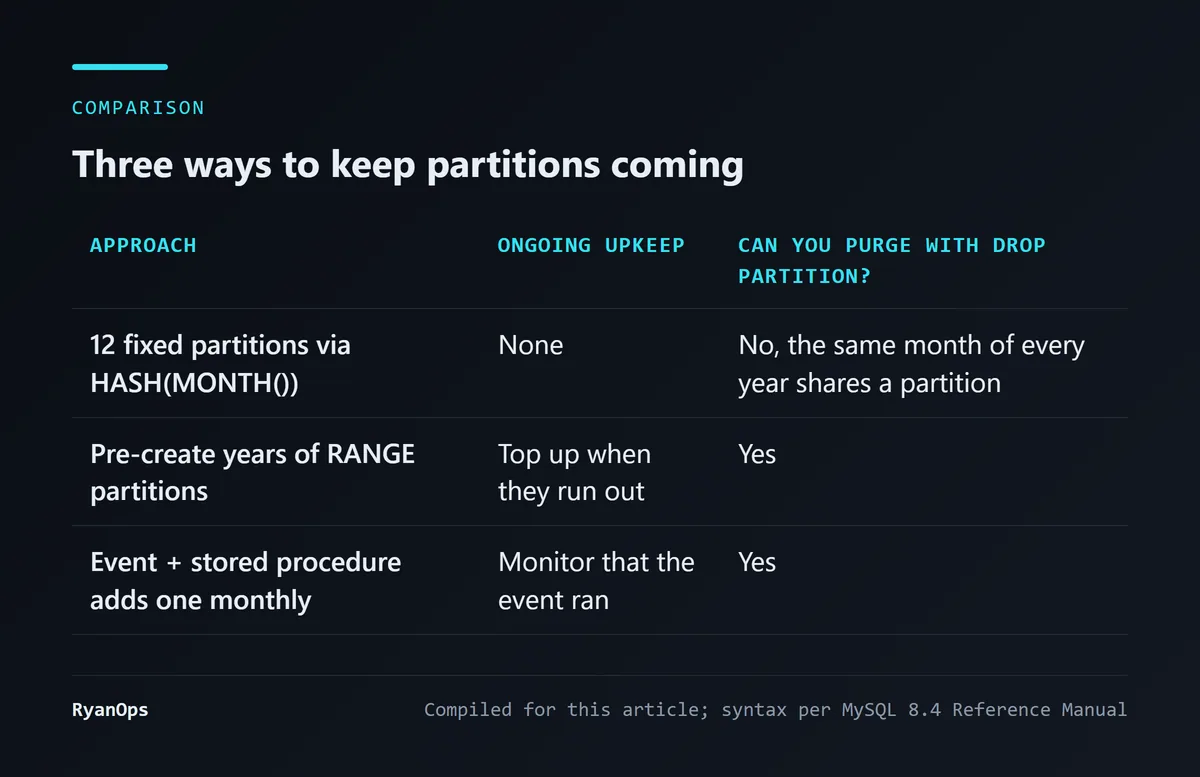 Figure: trade-offs of the three approaches (compiled for this article; syntax per MySQL 8.4 Reference Manual)
Approach one: twelve fixed partitions, set and forget
Use MONTH() to spread data across twelve fixed partitions:
CREATE TABLE failed_jobs (
    id BIGINT NOT NULL AUTO_INCREMENT,
    failed_at DATETIME NOT NULL,
    payload LONGTEXT,
    PRIMARY KEY (id, failed_at)
)
PARTITION BY HASH(MONTH(failed_at))
PARTITIONS 12;
The cost hides in the detail. August 2025 and August 2026 land in the same partition, because the basis is only the cyclical month number. If your goal is dropping data from two years ago with DROP PARTITION, this approach cannot do it at all. It only fits the case where you just want rows spread out.
Approach two: create several years of partitions up front
CREATE TABLE failed_jobs (
    id BIGINT NOT NULL AUTO_INCREMENT,
    failed_at DATETIME NOT NULL,
    PRIMARY KEY (id, failed_at)
)
PARTITION BY RANGE COLUMNS(failed_at) (
    PARTITION p202601 VALUES LESS THAN ('2026-02-01'),
    PARTITION p202602 VALUES LESS THAN ('2026-03-01'),
    -- and so on through future years
    PARTITION p203012 VALUES LESS THAN ('2031-01-01'),
    PARTITION p_future VALUES LESS THAN (MAXVALUE)
);
No scheduler, and one setup lasts years. The downside is that you still have to come back and top it up when the years run out.
There’s something here I need to correct. An earlier version of this article said that running ADD PARTITION on a table that already has a MAXVALUE partition would break the table. Going back to the manual this time, I couldn’t find support for that. The example on the “Management of RANGE and LIST Partitions” page shows that when a new partition’s upper bound isn’t higher than all existing ones, the statement fails with an error, and the table itself is fine.
 Figure: the manual’s example of ADD PARTITION returning ERROR 1463 when the bound isn’t high enough (source: dev.mysql.com)
MAXVALUE is already the highest possible bound, so nothing can be appended after it. That’s my inference from this rule; the page doesn’t demonstrate the MAXVALUE case separately and I haven’t run it on a live server, so I won’t commit to the exact error code. What is certain is the correct approach: use REORGANIZE PARTITION to split p_future into a new partition plus a new MAXVALUE partition. The manual gives a guarantee for this operation: no data is lost in splitting or merging partitions.
ALTER TABLE failed_jobs
    REORGANIZE PARTITION p_future INTO (
        PARTITION p203101 VALUES LESS THAN ('2031-02-01'),
        PARTITION p_future VALUES LESS THAN (MAXVALUE)
    );
Approach three: let an Event open a partition every month
Pair a stored procedure with MySQL’s built-in EVENT scheduler:
DELIMITER //
CREATE PROCEDURE auto_create_next_month_partition()
BEGIN
    DECLARE next_month_first_day VARCHAR(10);
    DECLARE partition_name VARCHAR(20);

    SET next_month_first_day = DATE_FORMAT(NOW() + INTERVAL 2 MONTH, '%Y-%m-01');
    SET partition_name = CONCAT('p', DATE_FORMAT(NOW() + INTERVAL 1 MONTH, '%Y%m'));

    SET @sql = CONCAT('ALTER TABLE failed_jobs ADD PARTITION (PARTITION ', partition_name, ' VALUES LESS THAN (\'', next_month_first_day, '\'))');
    PREPARE stmt FROM @sql;
    EXECUTE stmt;
    DEALLOCATE PREPARE stmt;
END //
DELIMITER ;

CREATE EVENT IF NOT EXISTS evt_auto_partition
ON SCHEDULE EVERY 1 MONTH STARTS '2026-08-25 00:00:00'
DO
  CALL auto_create_next_month_partition();
Every month gets its own partition, and purging old data is a DROP PARTITION. Three things need checking first, though.
Privileges. Creating, altering and dropping events requires the EVENT privilege, which the manual states outright. The earlier version of this article also told you to run SET GLOBAL event_scheduler = ON first and said that needs SUPER; both points need fixing. The 8.4 manual says the default value of event_scheduler is ON, so in most cases you don’t have to enable it yourself, and if you do need to change the global variable, the privilege is SYSTEM_VARIABLES_ADMIN — SUPER still works but is marked deprecated. Whether a managed cloud MySQL sets the scheduler to DISABLED varies by provider and I can’t check that for you, so run SHOW VARIABLES LIKE 'event_scheduler'; before you start.
Table structure. This procedure uses ADD PARTITION, which assumes the table has no MAXVALUE partition. If your table was built as in approach two, change it to REORGANIZE PARTITION, or the event will error every month.
Missed runs. If the schedule lapses for a single month, writes for that month fail. My suggestion is to add a monitor that periodically checks how far the newest partition’s upper bound is from today.
So which one should you pick?
My own view: with a moderate amount of data and no pressure to purge, pick approach two, because it has the fewest ways to go wrong. Approach three is worth it only once the data is large enough that you really do need regular DROP PARTITION, and it should be paired with a table definition that has no MAXVALUE. What would change my mind? If your team already has mature job monitoring, approach three costs much less to operate, and going straight to it is reasonable.
When does partition pruning stop working?
Only one thing matters: does your WHERE clause include the partitioning key?
With the orders table above, WHERE created_at >= '2026-01-01' lets MySQL skip p2024 and p2025 outright. But WHERE amount > 1000 never mentions created_at, so MySQL has to scan every partition. Partitioning doesn’t help at that point, and adds a little overhead from opening more files.
To confirm whether it kicked in, put EXPLAIN in front of the query and look at how many partitions the partitions column lists.
You can also name the partition yourself:
SELECT * FROM orders PARTITION (p2026) WHERE amount > 1000;The same syntax works for DELETE, UPDATE, INSERT and REPLACE.
Which two limits most often stall the whole plan?
Unique keys
The manual’s rule is one sentence: all columns used in the partitioning expression must be part of every unique key the table has, the primary key included.
Meaning that if a table has both PRIMARY KEY(id) and UNIQUE KEY(email), you practically cannot use created_at as the partitioning key unless you work it into every unique key. The manual includes a failing example of its own:
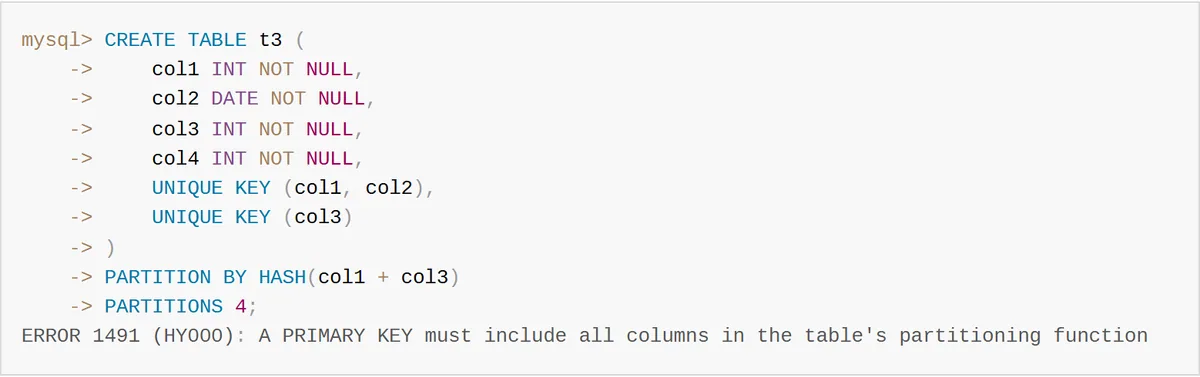 Figure: the manual’s example of ERROR 1491 when unique keys don’t cover the partitioning columns (source: dev.mysql.com)
One detail worth your attention: the t3 table in the figure has no primary key at all, yet the error says “A PRIMARY KEY must include…”. The first time you see that message it’s easy to go looking in the wrong direction and assume the primary key definition is at fault, when in fact any unique key that fails to cover the columns triggers the same sentence.
When retrofitting an older system, this limit regularly stops a partitioning plan cold. List every unique key on the table before you begin.
Foreign keys
The manual is absolute about it: InnoDB tables using user-defined partitioning do not support foreign keys. A partitioned table can’t define a foreign key referencing another table, and no other table can reference a partitioned table with one.
If your database relies on foreign keys for referential integrity, decide before adopting partitioning whether those checks move into the application layer or whether you accept dropping the constraints.
Partition count
What’s the ceiling? The manual gives a number: a table not using NDB can have at most 8,192 partitions, subpartitions included.
A ceiling isn’t a recommendation, though. The same page has a line I find more useful: in some cases, using large numbers (hundreds) of partitions may not be advisable, and using more partitions does not automatically lead to better results. It also warns you to watch open_files_limit when there are many partitions, and notes that LOAD DATA allocates a 130 KB buffer per partition. So if your arithmetic says you need over a thousand partitions, the likelier explanation is that you chose the wrong granularity.
How does it compare with PostgreSQL, Oracle and SQL Server?
I’ll stick to what I could check against documentation.
PostgreSQL’s declarative partitioning supports the same three methods: range, list and hash. Its biggest difference from MySQL is that you can attach a standalone table as a partition or detach one (ATTACH PARTITION / DETACH PARTITION). The PostgreSQL docs describe this as manipulating the partition structure, nearly instantaneous, rather than physically moving large amounts of data.
“No data moves” isn’t the same as “no cost”, though, and that’s the caveat I want to add after reading the docs. They state plainly that when you run ATTACH PARTITION, the table is scanned to validate the partition constraint, holding an ACCESS EXCLUSIVE lock on that partition for the duration. To avoid the scan, the official advice is to create a CHECK constraint matching the partition range beforehand and drop it once the attach completes. DETACH PARTITION requires an ACCESS EXCLUSIVE lock on the parent table by default; adding CONCURRENTLY lowers that to SHARE UPDATE EXCLUSIVE.
Oracle and SQL Server have had partitioning for longer, and the INTERVAL automatic partitioning mentioned earlier is Oracle’s. I didn’t check those two against their official docs line by line this time, so I won’t compare feature details here. The one thing I’ll say: very few teams switch databases purely for partitioning.
Should your table be partitioned at all?
Partitioning addresses the scale problems of a single table in storage, querying and cleanup. It doesn’t deal with one database server being unable to take the traffic; write throughput and server load call for read replicas, caching or sharding.
I’d decide with two questions:
- Is this table already large enough that whole-table operations like backup,
DELETEandALTERvisibly slow down operations? - Are queries heavily concentrated on one predictable column, most often time?
If both are yes, partitioning delivers its two benefits: pruning for query speed and DROP for cleanup speed. With only one, and especially when query conditions are all over the place and can’t reliably hit the partitioning key, you’ve probably just split one table into a pile of small files.
This piece takes the read-the-docs-to-the-end approach. If you’d like the other kind, a debugging log that starts from a visibly broken screen and traces it back to the cause, see the one about a sidebar shrinking from 200px to 48px.


